

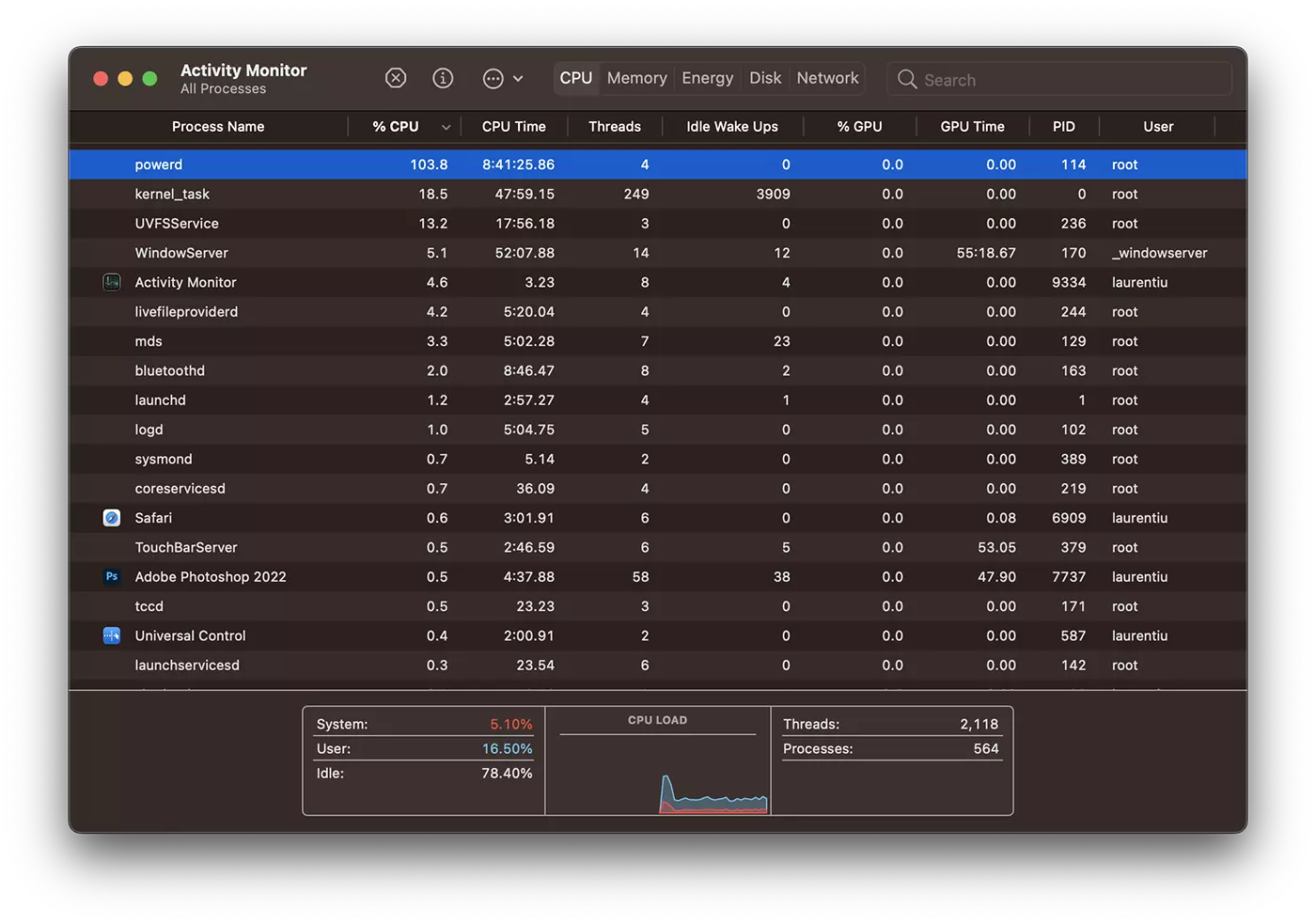
Fix powerd 100% CPU usage この期間にオペレーティング システムで発生した異常です macOS Ventura。プロセスのCPUリソースの過剰な消費 powerd 顔 MacBook / Mac 異常に騒々しい。それも理解できる。 CPU の過剰な消費はプロセッサの加熱につながり、換気システムがプロセッサを冷却しようとします。幸いなことに 解決策もあります ため 解決する これ 過度のCPU消費 プロセスの powerd。
目次
powerd が CPU を 100% ~ 105% 消費するのはなぜですか
この問題は、Apple がメール アプリケーションに追加した機能が原因で発生します。 ベンチュラマコー、 iOS 16 そして iPados 16。メール アプリケーションの新機能により、ユーザーは電子メール メッセージが自動的に送信される日時をプログラムできます。この操作は、プログラムされたタスクを通じて可能です。
% pmset -g sched
Scheduled power events:
 [0]  wake at 04/12/62 02:47:16 by 'com.apple.alarm.user-visible-com.apple.email.SendLaterDelivery' User visible: true
 [1]  wake at 04/12/62 02:47:16 by 'com.apple.alarm.user-visible-com.apple.email.SendLaterDelivery' User visible: true
 [2]  wake at 04/12/62 02:47:16 by 'com.apple.alarm.user-visible-com.apple.email.SendLaterDelivery' User visible: true
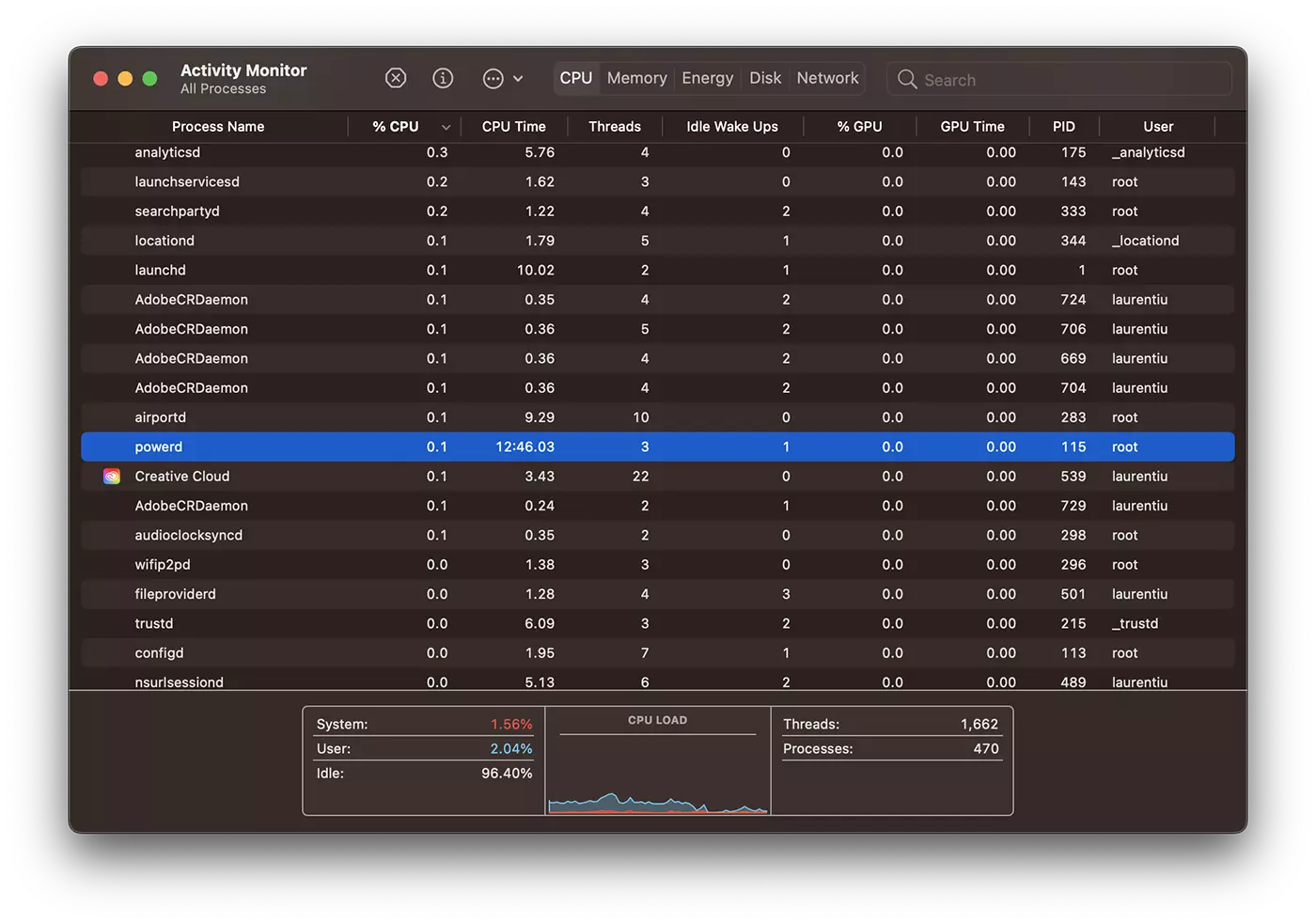
電源システムは、スケジュールされたタスクを実行するためにスリープに入らないようにしようとしますが、状況が少しおかしくなり、電源付きプロセスが異常に長く使用される無限ループに陥ります。通常、powerd は 0.1% の CPU を消費するはずですが、104% ~ 105% の CPU に達します。
% pmset -g assertions
2022-08-07 11:07:05 +0300
Assertion status system-wide:
   BackgroundTask                 0
   ApplePushServiceTask           0
   UserIsActive                   1
   PreventUserIdleDisplaySleep    0
   PreventSystemSleep             0
   ExternalMedia                  0
   PreventUserIdleSystemSleep     1
   NetworkClientActive            0
   InternalPreventSleep           1
....
   pid 115(powerd): [0x000002bf000d90a5] 00:00:00 InternalPreventSleep named: "com.apple.powermanagement.wakeschedule"
	Timeout will fire in 5 secs Action=TimeoutActionRelease
   pid 115(powerd): [0x000002bf000d90a6] 00:00:00 InternalPreventSleep named: "com.apple.powermanagement.wakeschedule"
	Timeout will fire in 5 secs Action=TimeoutActionRelease
   pid 115(powerd): [0x000002bf000d90a7] 00:00:00 InternalPreventSleep named: "com.apple.powermanagement.wakeschedule"
	Timeout will fire in 5 secs Action=TimeoutActionRelease
   pid 115(powerd): [0x000002bf000d90a8] 00:00:00 InternalPreventSleep named: "com.apple.powermanagement.wakeschedule"
	Timeout will fire in 5 secs Action=TimeoutActionRelease
   pid 115(powerd): [0x000002bf000d90a9] 00:00:00 InternalPreventSleep named: "com.apple.powermanagement.wakeschedule"
	Timeout will fire in 5 secs Action=TimeoutActionRelease
   pid 115(powerd): [0x000002bf000d90aa] 00:00:00 InternalPreventSleep named: "com.apple.powermanagement.wakeschedule"
	Timeout will fire in 5 secs Action=TimeoutActionRelease
   pid 115(powerd): [0x000002bf000d90ab] 00:00:00 InternalPreventSleep named: "com.apple.powermanagement.wakeschedule"
	Timeout will fire in 5 secs Action=TimeoutActionRelease
   pid 115(powerd): [0x000002bf000d90ac] 00:00:00 InternalPreventSleep named: "com.apple.powermanagement.wakeschedule"
	Timeout will fire in 5 secs Action=TimeoutActionRelease
   pid 115(powerd): [0x000002bf000d90ad] 00:00:00 InternalPreventSleep named: "com.apple.powermanagement.wakeschedule"
	Timeout will fire in 5 secs Action=TimeoutActionRelease
....
それは間違いなく必要です fix powerd 100% CPUというのは、MacBook で実際に作業することはできなくなり、過度の加熱もバッテリーの劣化につながることがわかっているからです。 t85o381l4ur3n71u
方法 fix powerd 100% CPU – macOS ベンチュラ
最も簡単な解決策は、スケジュールされた電源タスクをすべて停止することです。ターミナルでコマンドラインを実行します。
sudo pmset schedule cancelallコマンドを実行した後、 powerd CPU 使用率は即座に 0.1% に低下し、Mac ファンの騒音が止まります。
おそらく、Apple は macOS Ventura Beta の将来のアップデートでこの問題を解決するでしょう。
などのチュートリアルが必要ないように、 “How to fix powerd 100% CPU” 生産性を目的としていないデバイス以外にベータ版をインストールすることはお勧めしません。
私の場合、powerd プロセスのこの問題は、この機能を使用した後に発生しました Send Later 上 iOS 16。デバイス間の同期は MacBook のタスクを引き継ぎました。





































親切な皆さん、ありがとう)そして私はすでに放熱グリスを交換していて、クーラーが止まらないなんて一体どういうことだろうと思っていました。 1 つのコアが 100% で負荷がかかっていたのは、この 1 つのコアが残りの標準を過熱し、クーラーが最大までオンになったためです (
まさにこの問題がありました。バッテリーがどのように劣化したかがわかります。ほぼ毎分 1% 下落します。お客様との仕事ができず、とても不安でした。
ターミナルでコマンド ラインを入力し、次にシステム パスワードを入力すると、なんと、プロセスがすぐにシャットダウンし、30 秒以内にファンが回転し、MacBook は再びいつものように静かでスムーズになりました。
ありがとう、ありがとう、この素晴らしいヒントをありがとう。
ここで自分の知識や経験を無料で公開しているあなたのような人がいるのは素晴らしいことです。あなたは素晴らしいです!