

"Serial Number"(Series number) is a unique number, which distinguishes your Mac from all the others. It is a kind of chassis series at the car.
We need to provide it when we go with Mac / MacBook in Service warranty or report it to Apple in the situation where Mac-ul is stolen.
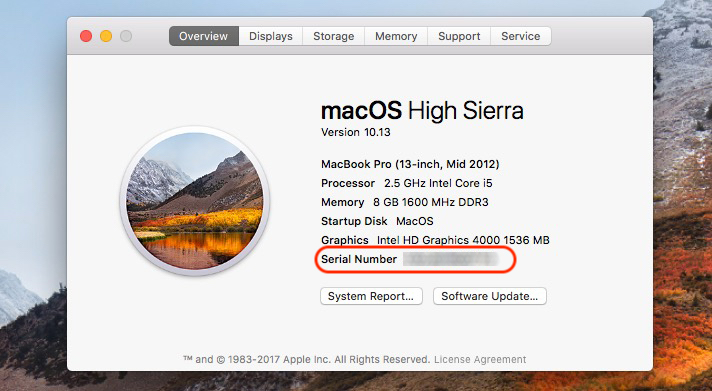
The easiest way we can find out Serial Number is the interface of the system OS X / MacOS. So much on MacOS High Sieera As well as on the older systems, it is available in the "Menu Bar" (Bara de Sus). Click on the apple (Apple logo) and "About This Mac“.
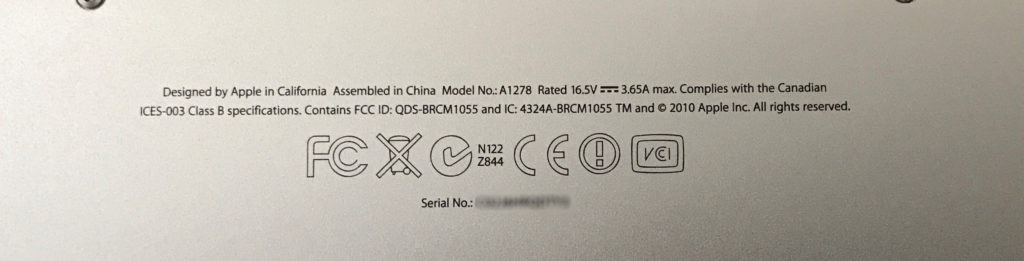
If the Mac has problems and does not open, another option is to take serial number on the original box, in which I bought it or was delivered to us, on the Bill or from the back of the Mac. On MacBook, Serial Number appears written on back cover.
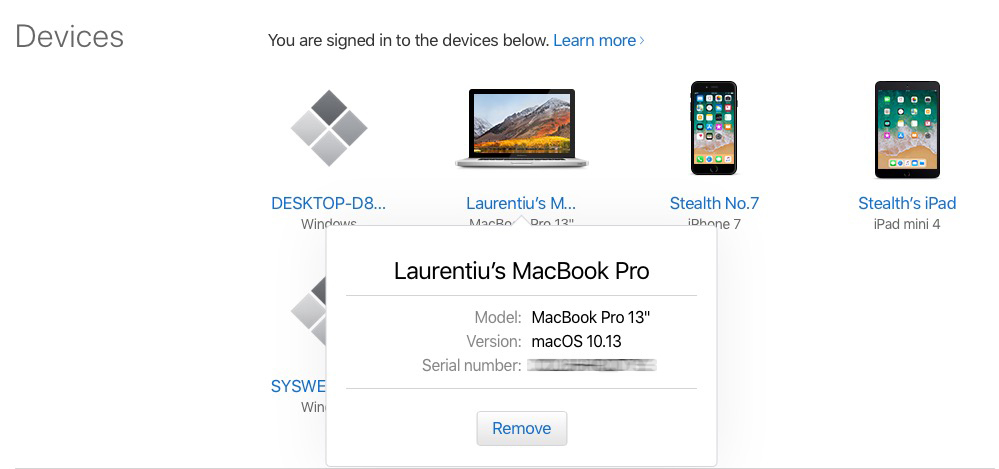
If you do not have access to the Mac nor the original box or other documents you have, you can find the number number on the Apple website, in your iCloud account. The condition is to have used the Mac associated with an iCloud account. 99% are likely to have done this.
Access https://appleid.apple.com, then to "devices" find all the devices that your iCloud account has been connected. Their series also appears to the details. Select "Mac", then in details you will see serial number.
This last method is very useful in a situation where a The MacBook was stolen. Also from the Apple website, from iCloud.com we can find out the location where our device is found. We have an option to block, locate, delete the data from it or start a sound alert.
We will detail more in a future article, about What do you have to do if an iPhone, iPad, iPod Touch, MacBook Pro, MacBook Air has been stolen or other Apple device.





































1 thought on “How to find out the number number of a Mac / MacBook, even if it was stolen"