
If it get our after list of compatible iPhones, published by Apple for iOS 11, we will see that the minimum recommended so that we can install and run the new operating system, it is iPhone 5s. In the case of the iPad, it is recommended not to be older than Air iPad, while for iPod, the only one that supports iOS 11 is iPod touch 6th generation.
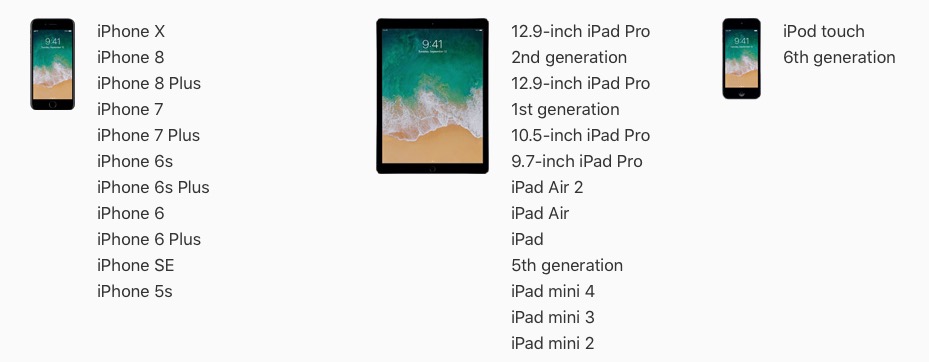
What you need to know, however, is that this list of devices compatible with iOS 11 will not warrant a smooth functioning of the devices. In case iPhone 5S and iPhone 6, there are many users who complain that the iPhone works very hard After you have installed iOS 11. Very hard to answer, se block applications or even remains blocked by all and it becomes broken.
Apple has accustomed us in recent years that the release of a major version of iOS coincides with the release date of an iPhone model. Around the middle of September, the launch events are held.
iOS 11 It was launched with iPhone 8, iPhone 8 Plus and iPhone X in 2017, iOS 10 It came with iPhone 7 and iPhone 7 Plus in 2016, iOS 9 with iPhone 6S and iPhone 6S Plus in 2015 and so on.
Even if with a new version of iOS, some 3-4 year old devices appear in the list of compatible devices, our recommendation is not to install this new version, except on a device with a maximum of two generations ago. In the case of iOS 11, it is not recommended to install it on iPhone 5S or iPhone 6. The processors of these devices will hardly cope with the new iOS.
Although iPhone the penultimate list iPhones compatible with iOS 11, this model was launched in the spring of 2016, being a "special edition" that has stronger features and hardware support than the iPhone 6 and iPhone 6 Plus. Basically, under his shell iPhone we find the same processor as in iPhone 6S and iPhone 6S Plus. So, you can run iOS 11 on iPhone SE without problems.
If you managed to upgrade to iOS 11 on an older iPhone, and it works very hard, solving the problem consists in downgradeto the previous version. The transition from iOS 11 at iOS 10.3.3.
You can do this using the application iTunes and the file IPSW which contains the iOS 10.3.3 operating system compatible for your iPhone or iPad model. Download IPSW is available on Apple's official website.
Downgrade from iOS 11 to iOS 10.3.3 it cannot be done for iPhone 8, iPhone 8 Plus and iPhone X. The minimum system supported by these devices is iOS 11.




































