
See what the PIN code of the SIM card helps and learns step by step how you can turn off the SIM PIN on the iPhone.
The PIN of the SIM card is designed to protect both the data stored on the card and the use of the phone number of unauthorized people if the phone is lost or stolen. It is also very important to be activated if you use bank applications. Most bank applications require authorization through a code ”One Time Password"Issued by SMS. In case of loss of the SIM card, if it does not have PIN code, unauthorized persons may have access to sensitive data.
Even if on the iPhone or another smarphone there is a safety code, if the SIM card has no PIN and is placed in another phone, it can be used without restrictions.
However, for many users it is uncomfortable to type the PIN of the SIM card after restarting the device and therefore prefer to deactivate it.
How do you disable SIM PIN code on iPhone
To turn off the SIM PIN code on the iPhone, go to: "Settings” → “Mobile Data” (sau Cellular) → SIM PIN. Here you have the option to deactivate SIM PIN or PIN change.
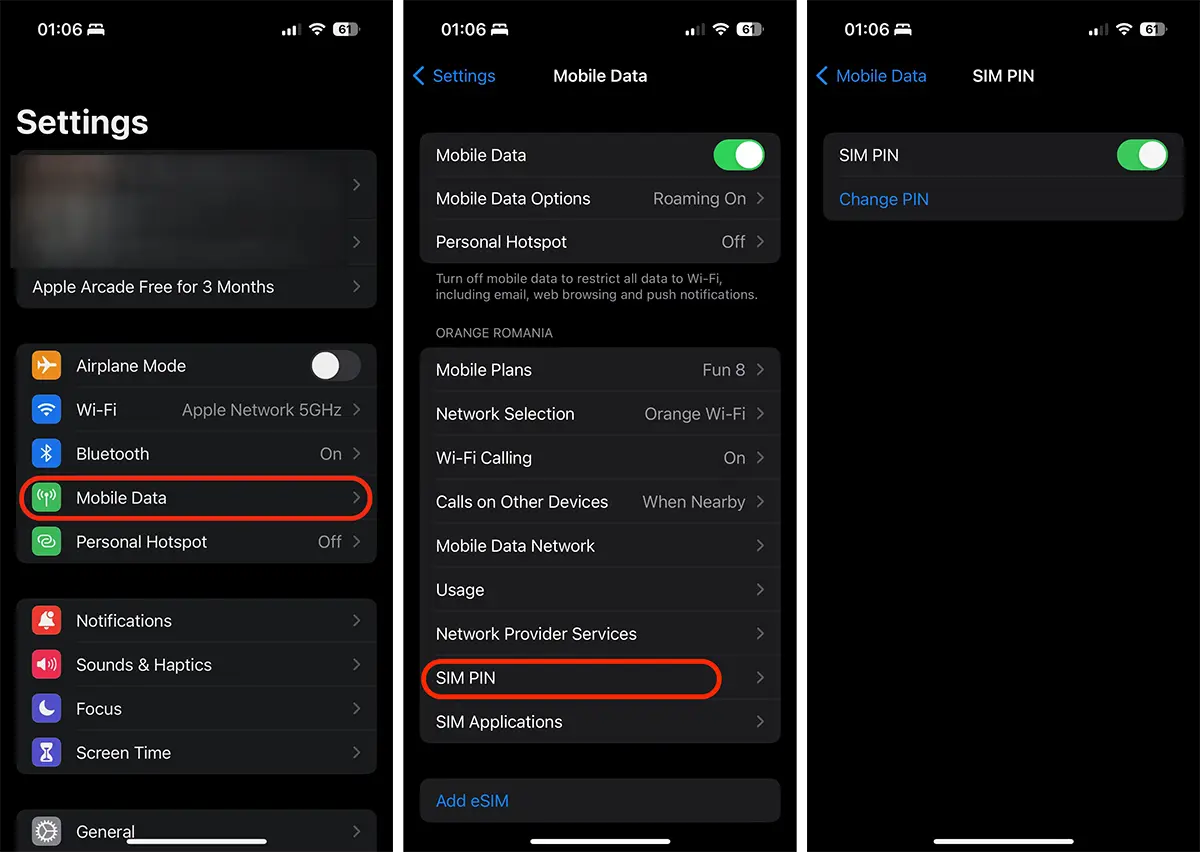
Slides the button SIM PIN, then enter the PIN for deactivation. This way you can disable SIM pine on the iPhone.




































