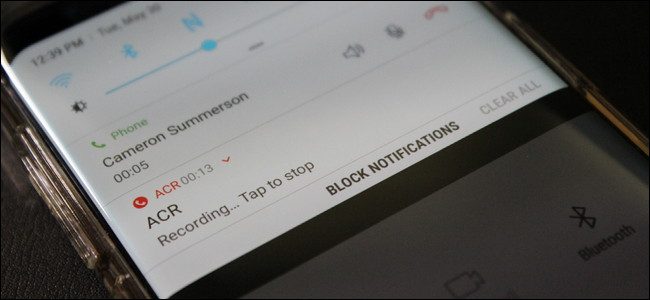

There are many moments in which I need to recording a telephone conversation. The reasons for registering a call are varied. Whether we need a record of the discussion to make a subsequent proof, or we want to keep the discussion as a reminder.
Mobile operators Register calls for "increase service quality"Or to prove the identity when you conclude a distance contract. In many countries, the registration of a telephone call is strictly forbidden without the prior agreement / acceptance of the interlocutor. Making a bracket from the subject of the article, it is a little weird how in some countries, mobile operator can use recording conversations In their own interests, and the interlocutor is restricted to them in the case of a dispute. Specifically, when you call Orange, Vodafone, Telekom, etc. Network and you agree with the registration of the call, at that conversation. you will never have access. Paradoxical.
So, before you record a call, make sure that in your country. is it legal to do this, or ask for the caller's prior consent. “I pay attention to that this call can be registered / registered“.
How can we register a conversation on Android (Samsung, LG, HTC, Huawei, Pixel, etc. Device)
In the ends, the mobile phones had this function incorporated in the operating system. With the international regulations by which in many countries the recording of phone calls, manufacturers of mobile phone and smartphones were forbidden to give up this option.
Phone calls can register However, with the help of a Android applications, specially designed to do this.

Call Recorder - ACR (Another Call Recorder) is one of the applications that help you register a conversation. First of all you have to descend the application in Google Play, accept its terms and conditions and then configure it. It has a rather intuitive interface and is easy to configure on any user level. Even if it offers many options, you do not need to be an expert in Android and applications to use it.
ACR (Another Call Recorder) saves records in audio formats: OGG, 3GP, MP4, WAV, so you can choose the type of file that brings you the most. In addition it has filtration options so you can automatically start recording calls for your preset phone numbers.
ACR Call Recoder options:
- Search
- Grouping of records after the date
– Auto-email (Pro)
-self-deletion of older records
- mark the records as important so they can no longer be deleted
- Multiple selection, deletion, reference
- displaying the contact name and photography
- exclusion of certain numbers
- Auto or manual registration (pro) of calls
- Password protection of the records
- multiple registration forms
- the ability to start the registration
-Different registration modes by number, contact, non-contact or only after the selected contacts
– Integrare Dropbox (Pro)
- integrate Google Drive (Pro)
- Webdav (PRO) integration
ACR (Another Call Recorder) comes in two versions. Free version and Pro variant that offers you some additional options.
All you have to do to Download and install, is to access Google Play on your smartphone and look for the application name.




































Visitor Rating: 4 Stars
Visitor Rating: 5 Stars
Visitor Rating: 4 Stars
Visitor Rating: 5 Stars
Visitor Rating: 1 Stars
How to display the photo of the contact!
Visitor Rating: 1 Stars
Visitor Rating: 3 Stars
Visitor Rating: 4 Stars
Visitor Rating: 4 Stars
Visitor Rating: 4 Stars
Visitor Rating: 3 Stars
Visitor Rating: 5 Stars
Visitor Rating: 4 Stars
Visitor Rating: 3 Stars
What program to use for recording Android 9?
Visitor Rating: 3 Stars
Visitor Rating: 2 Stars
Visitor Rating: 3 Stars
Visitor Rating: 2 Stars
Visitor Rating: 3 Stars
Visitor Rating: 3 Stars
Visitor Rating: 2 Stars
Visitor Rating: 2 Stars
Visitor Rating: 3 Stars
Visitor Rating: 2 Stars
Visitor Rating: 2 Stars
Visitor Rating: 1 Stars
Visitor Rating: 1 Stars
Visitor Rating: 4 Stars
Visitor Rating: 4 Stars
Visitor Rating: 4 Stars
Visitor Rating: 4 Stars
Visitor Rating: 2 Stars
Visitor Rating: 4 Stars
Visitor Rating: 3 Stars
Visitor Rating: 2 Stars
Visitor Rating: 1 Stars
Visitor Rating: 1 Stars
Visitor Rating: 2 Stars
Visitor Rating: 4 Stars
Visitor Rating: 4 Stars
Visitor Rating: 1 Stars
Visitor Rating: 3 Stars
Visitor Rating: 1 Stars
Visitor Rating: 4 Stars
Visitor Rating: 3 Stars
Does not work anymore