
I would start with a "Be careful which Facebook you access when you log inIt is very possible that the Facebook page you are accessing is not the official one, and when you enter user / e-mail address and password to access your Facebook account, to actually send them to malicious third parties.
This process by which the web page is cloned (made a faithful copy of the official one) in order to mislead uninformed users and obtain confidential data, is called "Phishing". Every year, thousands of bank customers fall into the net of criminals who practice this method. Thus, they end up without money in their accounts or with sensitive information leaked to third parties.
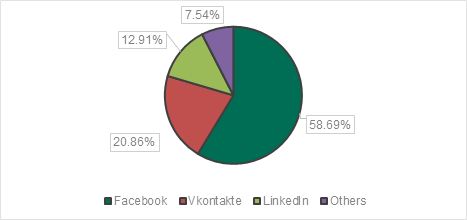
Among the social networks (social network), Facebook is the most cloned social network. In a report anti-phishing Al Kaspersky Lab it shows that Facebook "owns" 60% of the cloned web pages of social networks. And this only in the first quarter of 2018. (Q1 2018).
More precisely, Kaspersky managed to stop no less than 3.6 million attempts to visit fake Facebook pages.
How phishing is done and why Facebook pages are cloned
I talked about the cloning process a little above. A faithful copy of the Facebook login page is made, in which users are prompted to introduce personal dates for creating a new Facebook account or to authenticate with an existing one. In both cases, the registration and authentication process will not work and additional information will be requested to "verify identityThis information is personal data and personal data credit or debit cards. All this information entered by the victim will not reach Facebook, but the criminals.
In addition, for victims who already had Facebook accounts, obtaining the username and password by a criminal can provide them with valuable information. Passwords and banking information sent in Facebook Messenger messages, personal information and other confidential data that criminals can exploit.
Another danger is phishing through Facebook, done from the victims' real accounts. These accounts are used to publish or send in messages links to phishing web pages. Facebook friends might think it's a trustworthy link if it comes from a known person.
Facebook is not the only social network targeted by criminals. VK (social network from Russia) and LinkedIn they are also frequent targets of phishing. However, the 2.13 billion active users of Facebook send it to the top of the most cloned social networks in the world.
The fact that the criminals' targets are personal accounts of social network users shows us once again how important our personal data is. They can be used both in order to bring a quick profit by obtaining banking information and for manipulation or orientation in the directions dictated by entities or interested persons.
Cybercriminals constantly looking for new ways to hit users and steal confidential data. That is why it is very important to be very careful about your online behavior in order not to become the next target.
What you must do to avoid becoming a victim of phishing / phishing-scam
1. The most well-known method of cheating is done with the help of free Wi-Fi networks. Once you connect to a public wireless network with your laptop or mobile phone, you have no way of knowing that the accessed page of Facebook, PayPal or a bank is the real one.
Criminals can create clones of official pages in a wireless network, and to detect this is almost impossible if you do not have IT knowledge.
Don't even access it mobile application of a bank it is not very secure from a public wireless network. Confidential data can be decrypted / intercept inside the network. Therefore, do not use public wireless networks except for applications and accessing websites that do not involve the transfer of confidential data.
2. Always check the web address of the received links on mail or chat before clicking on them to open them. A web address used for phishing can be hidden behind a word with a link.
A small example. You can receive a message in the mail that prompts you to access urgently https://facebook.com, otherwise your Facebook account will be suspended. If you click on the "facebook.com" link, you tend to think that it will take you to the Facebook page. Try this on the link we posted and you will see the result. Google.com will open, not Facebook.com. A criminal will redirect you to a virus or phishing web page to take your confidential data. So, be very careful before clicking on a link.
3. Use a software antivirus able to filter malicious web pages. The manufacturers of antivirus solutions are constantly investing in new techniques for detecting and blocking web pages created for phishing. Kaspersky Lab offers such solutions. Some even free.
4. Check if the web page has HTTPS and if the domain name is the official one.
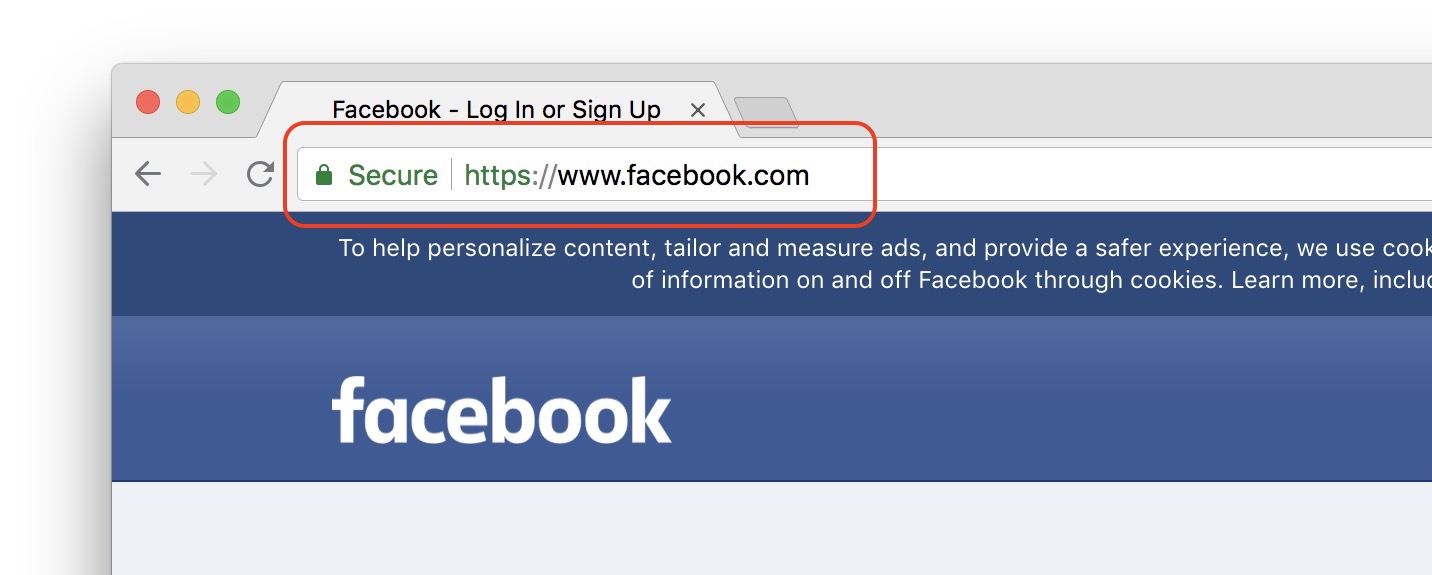
The websites of online banking, magazine online, social network or ad portals, all must use the HTTPS protocol. It ensures the encrypted transport of data between your computer / smartphone and the server on which it is hosted.
5. Never share your confidential data via e-mail or any other chat communication method. No bank, institution or social network will ask you for your bank card data, authentication data for different accounts by e-mail, SMS or messenger.
If these five points are respected, the probability of becoming a victim of a computer attack decreases a lot, but don't forget to be vigilant. Criminals always find the most "innovative" methods to achieve their goals. Let's not forget that before the anti-virus, there was the virus.