
It is not exactly recommended to install Mac applications from outside the App Store and even less applications from insecure sources. However, sometimes users risk compromising the security of the operating system and stability, with less safe applications.
One of the most common errors when installing applications without the developer signature, is: “App is damaged and can’t be opened. You should eject the disk image". A concrete example is when trying to run the application"Adobe ZII", Which we do not recommend to use.
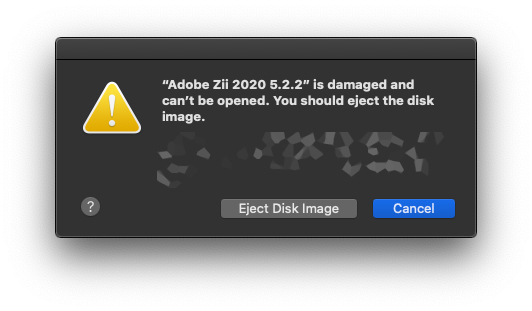
"Eject Disk Image"It is the best idea in such scenarios. But, if you still want to continue, there is a solution to solve the error:"Adobe Zii is damaged and can’t be opened. You should eject the disk image“.
1. Open the terminal utility with administration privileges. “sudo bash” .
2. We execute the order “xattr -cr” followed by the path of the application.
Example:
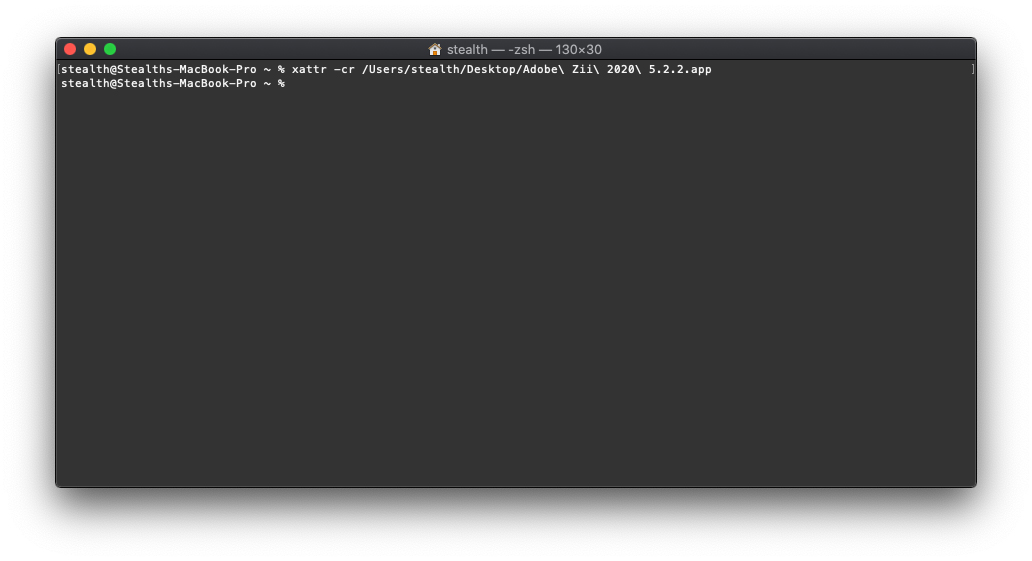
or:
sudo chmod +x “/Applications/Adobe Zii 2020 5.2.2.app/Contents/MacOS/Adobe Zii 2020 5.2.2"We press Enter for executing the control line, then open the application.





































I had the same error when I attempted to install Weka. I tried other troubleshooting, but none of them was successful. Finally, I found this article, and it worked! Thank you for sharing the tips!
Hello …… I tried the indicated solution, but unfortunately I was not successful…. There is some other way to get around this situation. Thank you, ABS
Excellent!
In many cases (not all) it works for prefect with this trick.
Gracias!
Hey Stealth, thanks for the detailed list. I just had an hour with other solutions, but with your help it works!
It worked (: