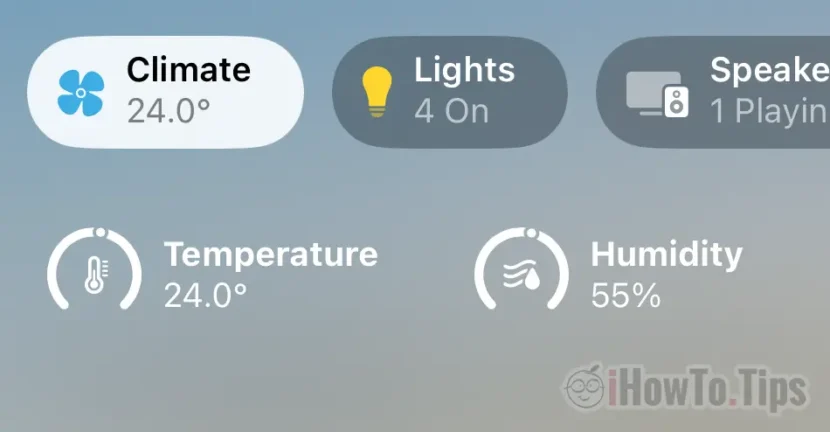

Did you know that you can see the temperature and humidity with the HomePod Mini, in the Home application? Climate in Home app.
Since they launched the second generation of smart speakers in 2020, Apple has not said anything about the fact that on HomePod Mini are sensors for ambient temperature and humidity. Moreover, this feature by which the HomePod Mini can also be a room thermometer was not activated by Apple until recently.
With the release of iOS 16.3, Apple enabled sensors Climate from HomePod Mini. Many owners were surprised to see Climate in the Home application, which shows the temperature and humidity. Personally, I didn't even know from which device these data were collected.
How to see temperature and humidity with HomePod Mini
1. First of all, you must have the latest version of iOS and / or iPadOS. A HomePod Mini and the Home application on iPhone and/or iPad.
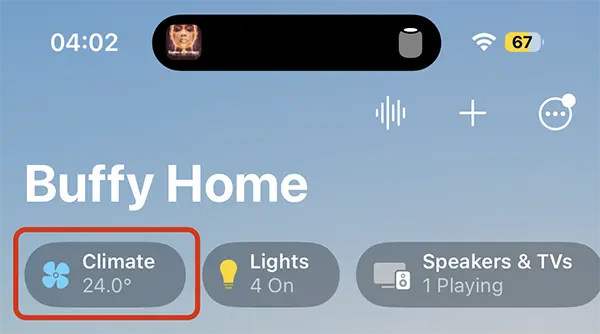
2. Open the Home application, and the upper part shows "Climate". As in the image above.
Each HomePod speaker can be assigned to a room in the house or a zone. Thus, if you have more HomePod Mini, you will know the temperature and humidity in every room where there is a HomePod.
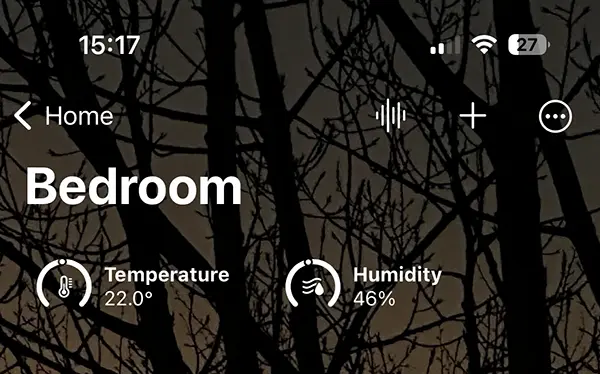
You don't need to configure anything for the new "Climate" feature to appear in the Home application on the iPhone or iPad.
With this feature, automations can be set depending on humidity and temperature. For example, you can set from which humidity value to start the dehumidifier or from which temperature to start the air conditioner.