

In the WWDC21 event, Apple announced new features of iOS 15, operating system that will be present on the iPhone starting with the fall of this year and that brings some news and major changes.
Among the applications and services developed by Apple for devices in the ecosystem, FaceTime is among those receiving a major upgrade.
Table of Contents
FaceTime Link
This is a long-awaited feature by Apple users who want to video calls via FaceTime to no longer be limited by the use of iPhone, iPad, iPod touch or Mac.
FaceTime link permite sa cream links for video calls and share them with the people we want to invite to the conversation. The video call entry links can be opened from any web browser present on Android, Windows, Linux or another operating system with a browser and video support.

FaceTime links can be shared in the Calendar application, from where we can invite friends, family or colleagues to the next video meeting on Group FaceTime.
SharePlay FaceTime
SharePlay will definitely increase the interaction between FaceTime users and opens a new way for Apple on the way to existing services in applications such as: Zoom, Microsoft Teams, Skype and Google Classroom.
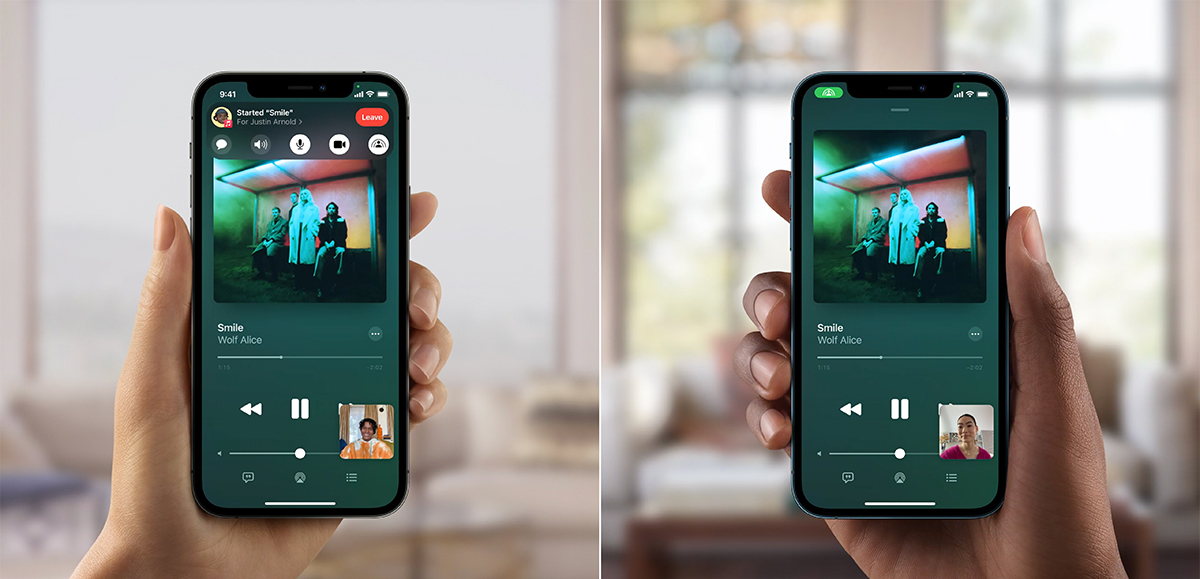
Through FaceTime SharePlay we will be able to share the iPhone screen for the session participants, to listen to their music to watch movies together with friends or family. SharePlay will be a feature present on all Apple devices with FaceTime support.
SharePlay – Share music via FaceTime
SharePlay – Sharing video content (movies) via FaceTime

While playing media content via FaceTime SharePlay, thanks picture-in-picture, participants will be able to open other applications on iPhone, iPad or Mac without problems, while watching the shared content. I can surf the web, send messages or carry out other activities.

If we have an Apple TV at hand, we can download the shared media content via FaceTime SharePlay directly on the TV. This way we can watch our favorite movies or shows with friends, sitting comfortably on the sofa.

Apple has taken the sound and image quality during FaceTime calls to a new level.
Starting in the fall, FaceTime will receive Spatial Audio and Portrait Fashion for video calls. Voice and video calls through FaceTime will be more natural than ever, Apple promises.
Spatial Audio si Noise Cancellation
With "spatial audio" the sound will be more natural, and for Group FaceTime SOUND it will come from the direction in which the speaker's icon is. Plus the speaker icon will be highlighted. Something similar Skype for Business.

For voice calls, we can also talk about a new feature capable of dimming ambient sounds. With this new "noise cancellation", ambient sounds will be eliminated during FaceTime calls. A very well thought out feature, especially since all these innovations do nothing but push FaceTime towards a robust application also thought for business.
Regarding the image quality of FaceTime video calls, it will be introduced "Portrait Fashion". The same mode that we find in the native "Camera" application on the iPhone or iPad. "Portrait Mode" will focus only on the person and blur everything behind. Another feature that we can say again is also thought for business.

These will be the major changes that will take place on FaceTime starting with iOS 15 from next fall. It is understood that these new features cannot be compatible for all Apple devices. "Portrait Fashion” will be available only on iPhone and iPad with A12 Bionic chip (or newer model) and on Mac with M1, and “spatial audio” on all iPhone and iPad with A12 Bionic and all Mac models from 2018 or newer.
These limitations come from hardware considerations.
Shared links for FaceTime video sessions will be accessible on Windows and Android from Chrome or Edge. Browsers that support H.264 video encoding.




































