

Without function Search that we can We are looking for a word or phrase in a conversation or in a group conversations, no application of Chat messaging is not complete.
Normally all applications of text messages I allow the search for a word in conversations, but some have the function at ideana, others less. Some we really wonder if they have this option.
Whatsapp It is not one of the applications that has this function right at hand. Moreover, for a long time there was no possibility to seek a word in a conversation.
In a recent update, the new search feature was added to WhatsApp only for iPhone owners. Even if an update has been made recently for Android, users will have a bit to be expected until this search function in conversations will be present on their phones.
As we are looking for a word in a conversation from WhatsApp
1. We open the conversation or conversation group and press on the top name.
2. In the details and settings for profile of the conversation partner, the new "chat search" function appears.
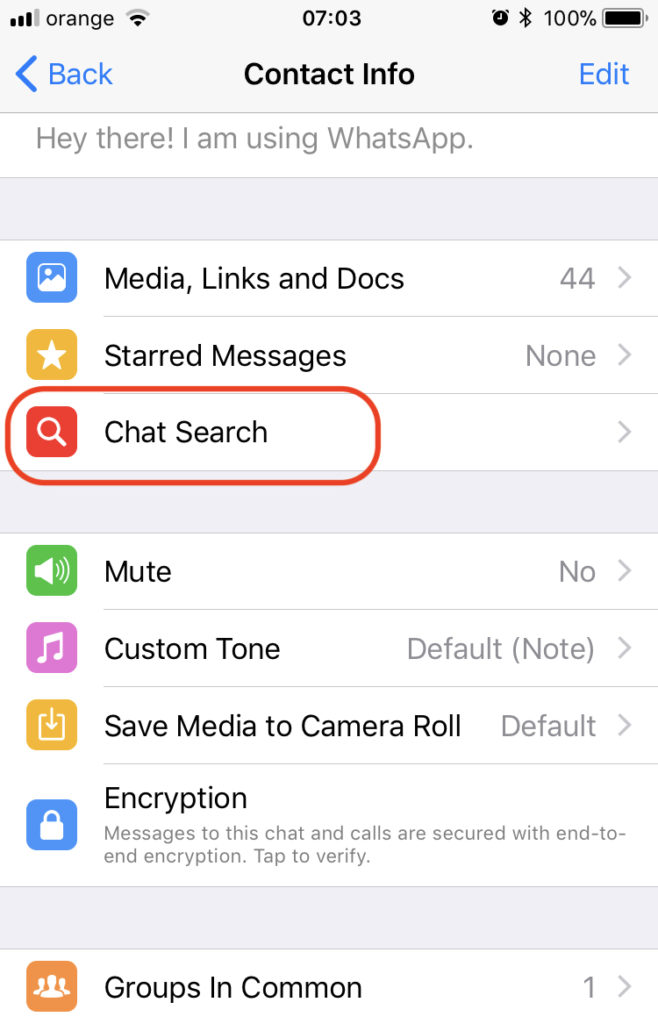
3. After we press on "Chat Search", The conversation will open, and at the top, the search bar. We type the word that interests us to find it in the conversation.
It is very possible that in the following updates, this function of Search conversations to be much more accessible. Eventually to be done by a simple "swipe".
Anyway, it's a good step by Facebook, in the new update for WhatsApp,




































