
With iOS 12.4, which we talked about in previous article, Apple introduced a very useful feature to those who they bought a new iPhone and I want to quickly transfer all the data from the old iPhone.
In the past, data could be transferred from the old iPhone to the new one only through iTunes or using backup from iCloud account. Of course it needs one data cable or an internet connection that allows downloading backups from iCloud.
In iOS 12.4, an option was introduced migrate rapidly, wirelessly, of data between two iPhones. Without the need for cable, iTunes or an iCloud backup. The condition is that both the old iPhone on which the data is stored, as well as the new one, be updated to iOS 12.4.
How to quickly transfer data from old iPhone to new iPhone via Wi-Fi
Before the data transfer, it is very important that that Old and new iPhone to be open and close to each other.
During the fast initialization process (Quick Start) of the new iPhone, choose “Transfer from iPhone” and follow the authentication steps with Apple ID, then press on "Continue“.
Expect that on the new iPhone, an animation will appear, then put the old iPhone on top of the new one and fix the animation. The "Camera" application will be opened, and the process will end with the message "Finish" displayed on the new device. This is how the local, wireless transfer between the old iPhone and the new iPhone is done.
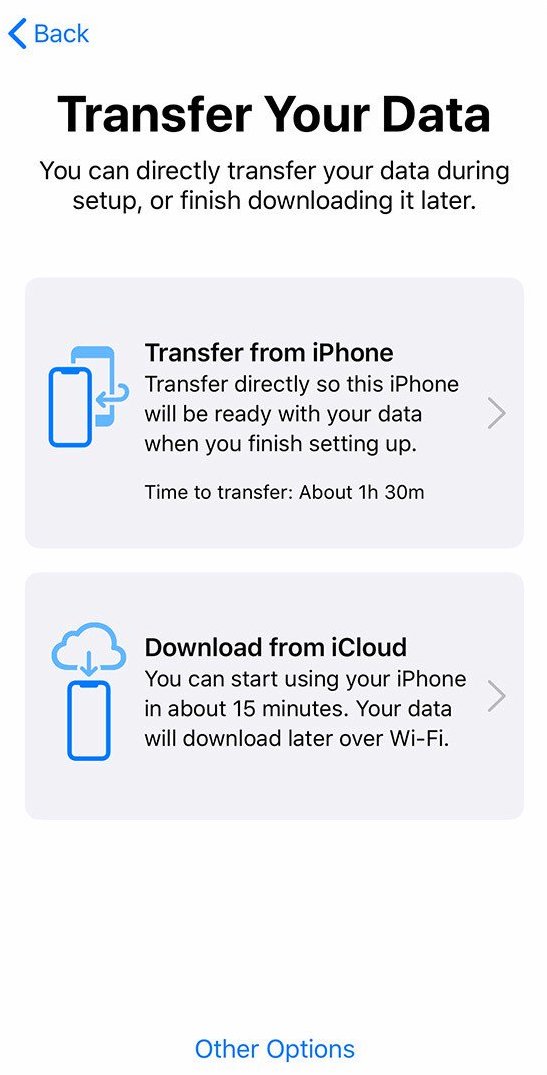
The time of direct data transfer will depend on their volume. If you have a lot of photos and videos on your old iPhone, the transfer time will automatically be longer.
If the camera does not work on your old iPhone, follow the manual authentication steps. "Authenticate ManuallyThe device password (passcode), Face ID or Touch ID will be used as the authentication method.




































