

Are expensive but have their own operating system, they are very stable, reliable and quiet. These are the basic features of Mac and MacBook.
But sometimes certain maccos system processes will give users, and a silent MacBook turns into a noisy one where CPU fans (Fan CPU) begin to be heard very hard, and open applications to run more and more slowly.
The simplest way we can see what processes most CPU, RAM, Disk, Energy, is the activity manager "Activity Monitor"Here we receive real -time reports with the activity of active applications and processes and we can choose to sort them according to consumption for each monitored system component.
One of the maccos processes that most often help to use over 100% of the CPU is "kernel_task"
Table of Contents
What is the "kernel_task" process on Macos?
One of the most important functions of "Kernel_task" is the regulation of CPU temperature. When a “is presenthigh CPU load"And in Activity Manager appears in the top consumption CPU resources" Kernel_task "process, it means that MacBook got very hot or is about to warm up.
MacBook has more thermal sensors What are monitored by the subsystem Core Duet, which together with SMC Manages internal services.
When one of the sensors reports a abnormally high temperature, Core Duet performs a series of actions to try to cool that area. The fans are turned at high speeds to blow cold air over the excess heated component and to allow the CPU to run in optimal parameters. Sometimes, if the cooling cannot be done in a timely manner or if the excess heated component is still requested, it automatically goes to reduce CPU activities through kernel_task.
So, not the process ”kernel_task"It is the cause of the CPU request for a MacBook, but it is a consequence of the overheating of some components and action of the temperature monitoring and control subsystem, following the answers received from the thermal sensors.
What do we have to do if we have a high CPU Load with "kernel_task" in the top?
The attempt of Turning "kernel_task" rolling is not a solution. First of all, it would not be indicated at all that at the time of an overheat to stop the cooling systems, and in the row it is about a MacOS system, not a user process performed on an application.
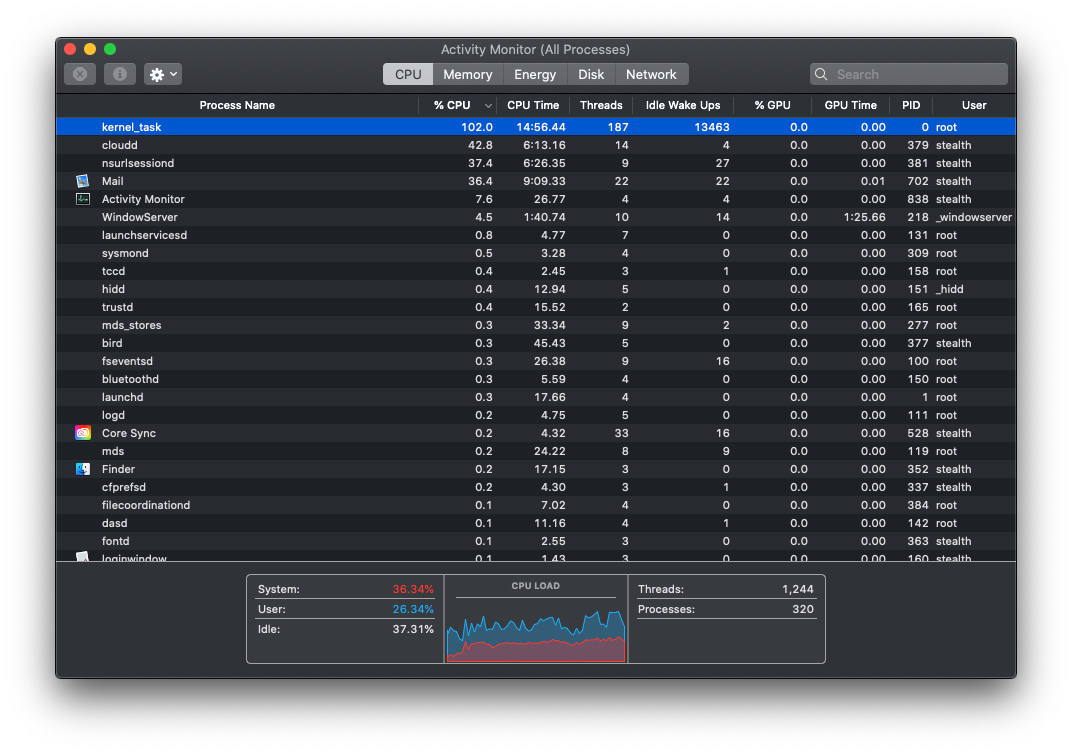
When cooler fans become noisy Due to the high speed, and in the activity manager this process appears in the top CPU, it is good to close the applications that could consume CPU resources and wait until the system cools. The moment when Kernel_task will significantly reduce the consumption of CPU resources, and the fans will become silent again.
There are also rarer scenarios in which, although there is no thermal problem, a sensor reports erroneously, the fans begin to speed with power and "kernel_task" gets to consume huge CPU resources, sometimes even over 400%, effectively blocking the entire system. In this case it is good to make a reset of the management and control system (SMC).
How-To: How to reset SMC (System Management Controller)
After resetting the SMC Everything should return to normal and no longer the erroneous reports of the thermal sensors.
There are also scenarios in which at the MacBook models with USB-C loading ports, when the power is made on a port, "Kernel_task" to occupy large CPU resources. This problem arises due to a thermal sensor mounted near the USB-C port of loading on the left. Avoid very simply by loading MacBook through a port on the right. As we know, all USB-C ports of a MacBook can be used to connect to the charger.




































