
Telefoanele mobile smartphone ofera spatii generoase de stocare pentru photos & videos, au display-uri generoase pe care pot fi vizualizate foarte bine, iar prin intermediul multiplelor aplicatii mobile, le putem edita dupa bunul plac. Cu toate acestea, avem nevoie de multe ori sa transferam pozele si filmuletele facute in vacante si concedii, de pe smaprtphone pe laptop sau pe calculator.
For the transfer of media content on Android to Windows PC, Microsoft has developed the Protocol Transfer Protocol (MTP). It offers a quick transfer support of the files between the Android phone storage space and the computer storage space. Of course, they can also be transferred from the smartphone, directly to the external hard drive connected to the PC / laptop.
Both the MTP connection and the transfer process can be made very simple, but there are scenarios in which any action on Android files (moving from one location to another, for example) can lead to the sudden loss / disappearance of all pictures and videos. Both from Android and Windows. If you ever ask yourself ”Why did my pictures disappear on my phone?", Most likely you used an MTP connection when you transferred them.
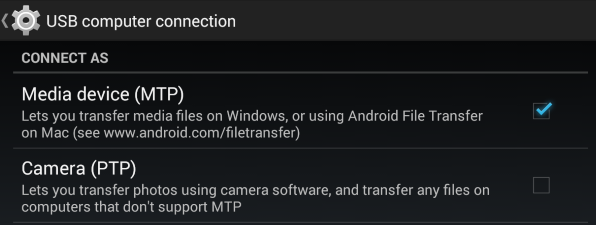
The loss of media content After a MTP transfer has been reported on most smartphone models: Samsung, NOKIA, HTC, LG, NEXUS, Motorola, etc.
How can we transfer pictures and video from Android to Windows 10, safe
It would be quite unpleasant to lose our pictures and videos taken at an event or on holidays / vacations. To avoid these unpleasant situations, first of all it is good to use a service of cloud where they are stored. At least as a backup solution. Google Photos offers such an option and is very easy to install and use.
Copying files on Android on Windows 10 can be done in several ways. Apart from MTP we have at hand:
- Moving or copying files from Android to Windows, directly accessing the phone storage space.
- Copying from Android to Windows using Windows Gen: Directory Opus or Total Commander.
- Opening of ports for FTP, Webdav and accessing them through dedicated transfer customers
- If the files are stored on the SD Card, most computers can read directly from the SD and the file transfer can be made.
We do not recommend that the transfer be done through a Photo manager or atheist dedicated albums. It is very indicated that during copying the media content from Android to Windows PC, do not move or delete files from the smartphone. Eventually stay away from the smartphone until it finishes the file transfer.