

The battery is an essential component of your MacBook, giving you the freedom to work, play and enjoy multimedia content wherever you are. Whether you use the MacBook for work, school or simply for entertainment activities, it is good to check the MacBook battery wear. Battery charging and performance capacity can make a difference between working on MacBook without worry or having to look for sockets.
When you want to buy a used Macbook or you simply want to check the MacBook battery wear, you need to know how you can see the number of charging cycles, battery condition and maximum charging capacity. These three landmarks provide information about the degree of use, health and wear of the battery.
Table of Contents
MacBook battery life
Compared to other models of laptops on the market, the balance between the maccos operating system and the energy consumption of hardware components, make the MacBook devices on a leading place in terms of battery life. In addition, the new MacBook models with Apple Silicon face (M1, M2, M3, newer generations), have a much lower energy consumption, compared to older models, equipped with Intel processors.
However, MacBook's batteries are by no means perfect and without problems. Over the years, Apple has often had problems related to this component, launching recovery programs in service for certain macbook models on which the battery has started to swell or prematurely degrade.
See: MacBook with swollen battery and deformed housing.
How to check MacBook's battery wear. The number of charging cycles and battery status.
The number of MacBook's battery charging cycles represents the total of full battery charges and discharges over time. A complete charging cycle occurs when you use the battery energy in its entirety, then recharge it to maximum capacity. On average, a MacBook battery has a lifespan of about 1000 charging cycles.
To find out the number of MacBook's battery charging cycles, you must open the system system ratio, where there is information about all hardware components. “System Report”.
For older maccos operating systems, click on Apple Logo (), click on "About This Mac", then click on "System Report".
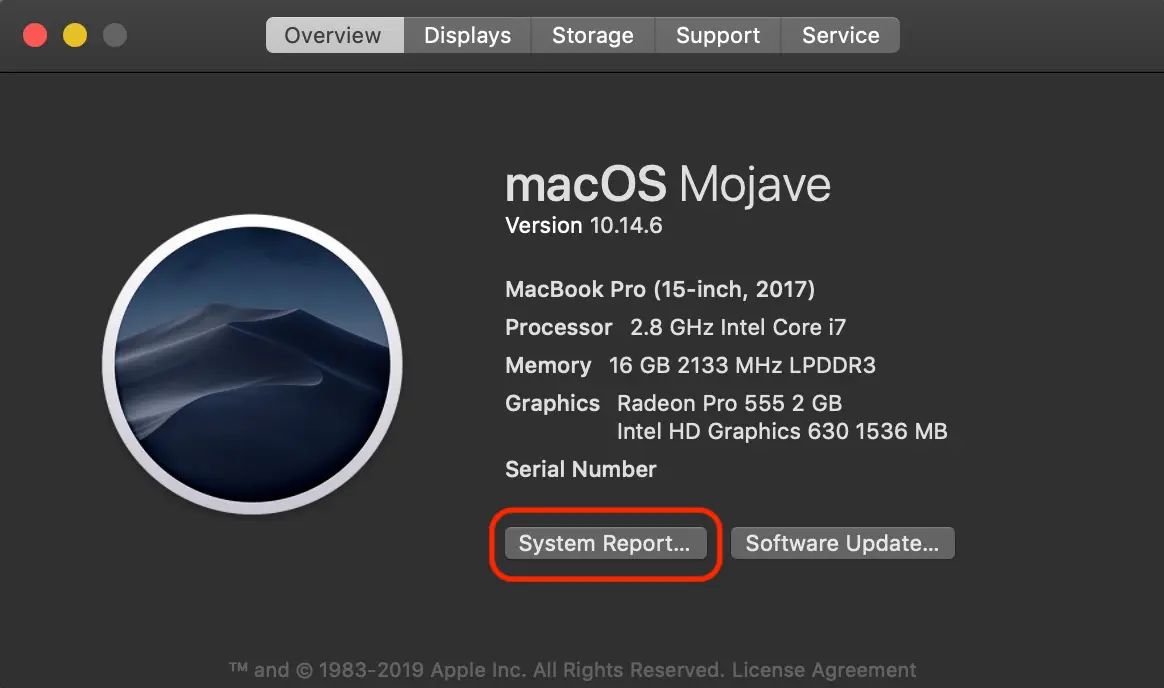
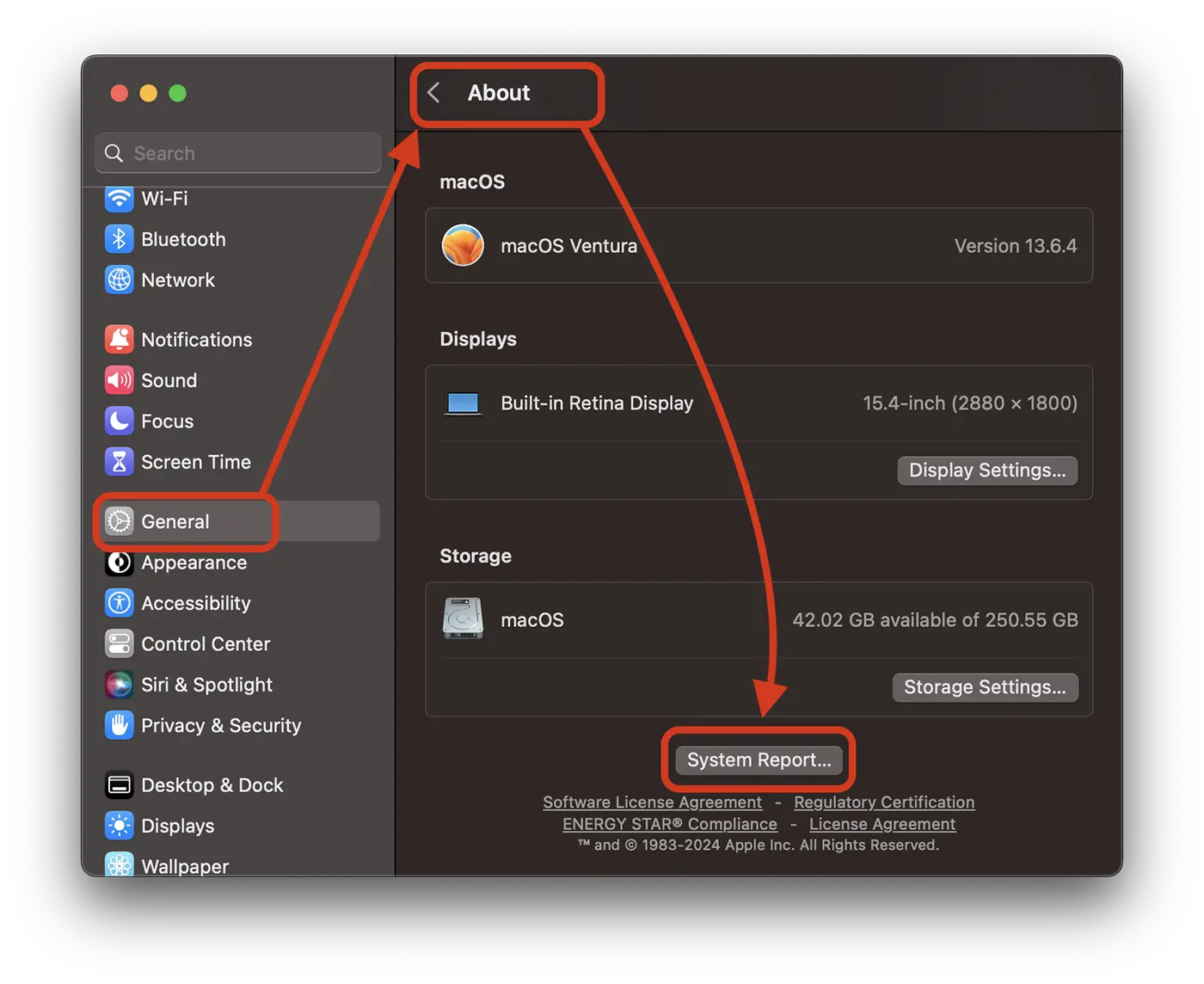
At the newer versions of the maccos operating system, the system ratio can be accessed from: “System Settings” > “General” > “About” > “System Report…”.
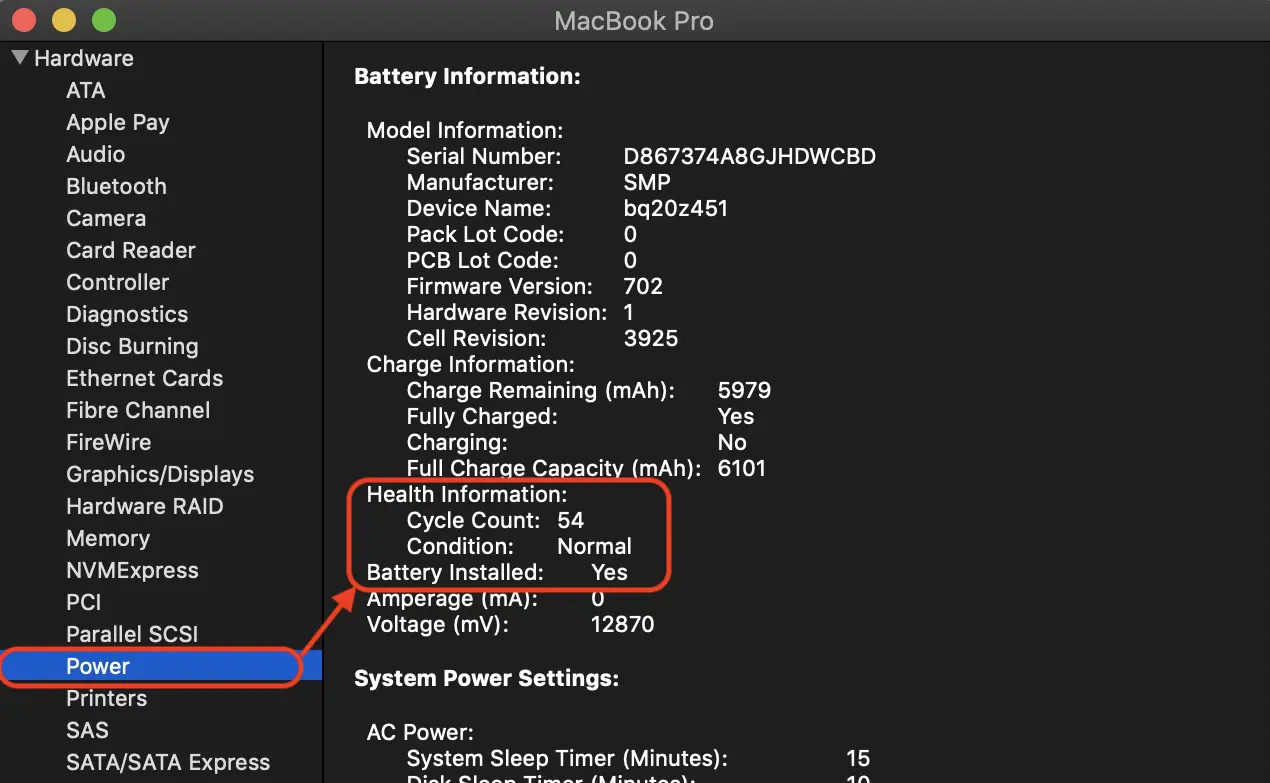
At "System Report" go to the left to: "hardware" → "power". All the battery information will be displayed on the right. From here you can see the state of the battery, the number of charging cycles and the maximum capacity at which it can be charged.
In the image below, the battery of this MacBook has 54 charging cycles and a normal condition. The small number of charging cycles does not necessarily mean that it is not a used battery. Long -term connection to the power supply when the battery is charged, it can degrade a lot. The status that indicates the condition of the MacBook battery is more important than the number of charging cycles.
To read and: MacBook with swollen battery and deformed housing.
How you see maximum current MacBook's battery charging capacity
Another indication of MacBook's battery wear is the maximum current capacity it can retain. With the passage of time, the physical wear of the battery causes a lower charging capacity than when it was new. The lower the maximum charging capacity is lower than the maximum battery capacity at the time it was new, the more worn it.
This information about the maximum MacBook battery charging capacity at the present time, is also displayed at the system report. Maximum Capacity.
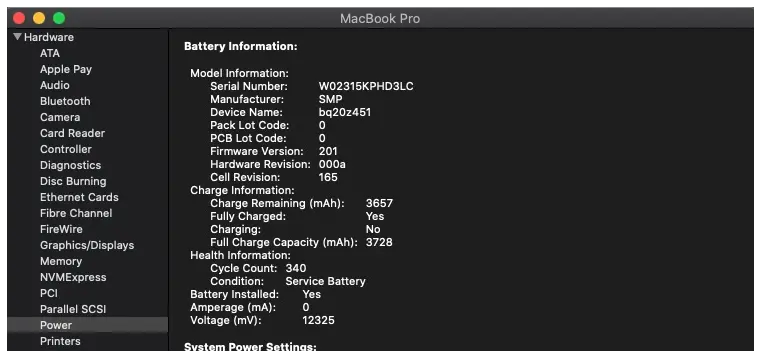
In the above report, the maximum MacBook battery charge is 3657 mAh of 3728 mAh. Therefore, MacBook's battery wear is quite low.
Related: How to see if the MacBook battery works normally.
In conclusion, to determine how worn the battery of a MacBook, you must check: its operating state (Battery Health), the number of charging cycles and the maximum current capacity. It is also to be checked by an exterior inspection, if the battery is swollen or upgraded in a long time when no applications are run.




































