

A simple tutorial that is valid on both Mac and Windows PC. And as a problem, but also as a solution.
Although we encourage the use of torrentelor than for legal purposes, many Internet users use these resources Download programs, film, games, operating systems, courses and other madness. It is a simple and fast way to download large data packages in a very short time, if at all your internet connection help us It is also somewhat safe from the point of view of a viral potential, if a torrent is downloaded from a united community where users interact well with each other. Gender filelist.ro.
I've seen many users that are complaining of lock computer or laptopafter I start Download a torrent.
Too few times this problem occurs because of RAM (memory) and CPU (processor) resources. In most situations it is about overworked hard driveof the In recent years, the speed of the Internet has increased a lot, and the old ones hard disk-s, especially those with 5600 rpm I can't cope with the download speed. More precisely, a good Internet connection allows writing a very large volume of data on the hard disk in a very short time. If we don't have one HDD cu 7200 rpm or a SSD with superior write/read speeds, then locking the pcor laptop is almost inevitable when downloading large files from torrents.
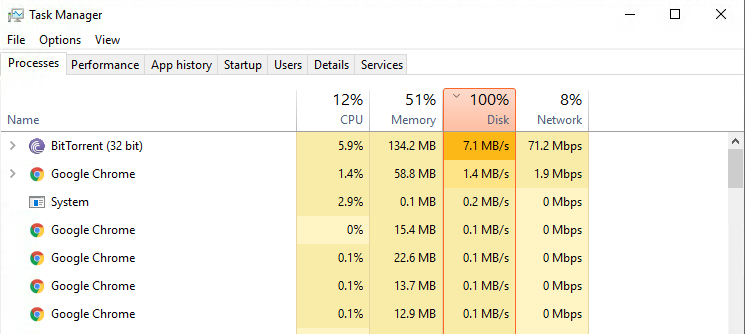
The problem can be solved simply through limiting the download speed of all the files that are being downloaded from the torrent or only some of them.
BitTorrent, one of the most used applications for downloading and uploading torrents, offers very simple solutions for these limitations.
Open the application, go to the menu Options > Bandwidth, and at "Global Download Rate Limit” set the maximum download speed in kb/s.
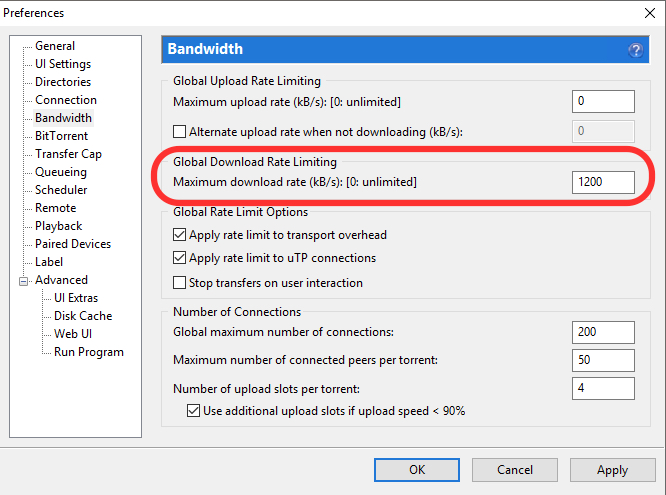
Also here it is good to have the options "Apply rate limit to transport overhead"si"Apply rate limit to uTP connections“. Apply & OK pentru salvarea modificarilor.
Another method of limiting the download speed on the torrent is the individual one.
Go to the list of files that are available for download, select and right-click. In the menu that opens, go to "Bandwidth Allocation", then we have several limitation options.
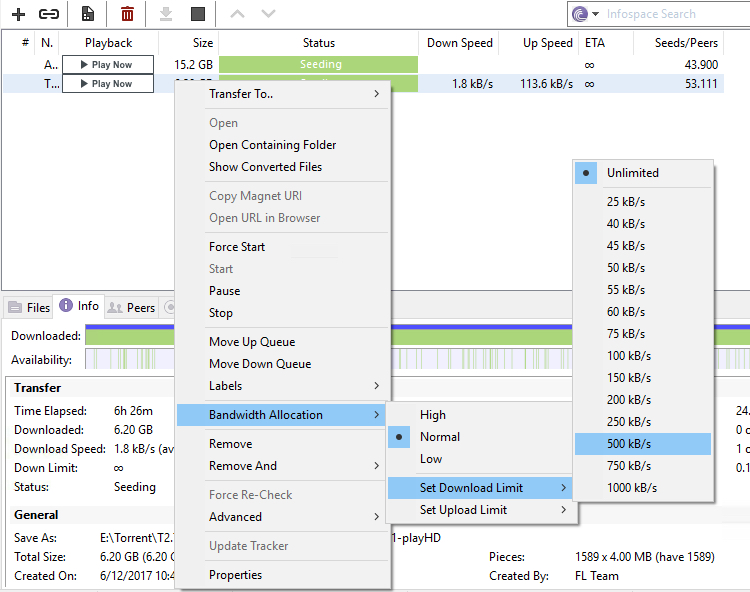
We have the possibility to choose "Hight", "Normal", "Low" or to set a default download speed between 25 kb/s and 1000 kb/s.
Limiting the download speed will reduce the demand on the hard disk and implicitly avoid blocking the calculator or laptop for this reason.
We also find these limitation options on other torrent download applications, regardless of whether they are for macOS or Windows.




































