

The repair state on the iPhone is a new way that needs to be activated when you have a defective iPhone device and you have to go with it in an Apple Apple Service.
Before you go with a Mac, iPad, Apple Watch or iPhone device in an Apple Authorized Service, it was necessary for the device to have the Find My Disabled service. This method is confirmed that the device is sent in service by the owner, and not by another person. Starting with iOS 17.5, Apple has introduced the repair status on the iPhone (Repair State) for devices that need service, whether or not they are during the guarantee period.
This new option is necessary after Apple has introduced "Stolen Device" on the iOS 13.7 version. "Stolen Device" is an additional protection option that prevents the "Find My" service for one hour if the device is not in a known location. So, many iPhone owners had to wait in Apple stores or service centers until they managed to disable the "Find My" service.
Related: Stolen device. Additional security protection for iPhone.
How to activate the repair module on the iPhone?
First of all, do not activate this repair (repair state) repair mode when the device is to be delivered to an Apple or Apple Shop authorized service.
Activating the "Repair State" mode is made very easy from the "Find My" application, if you are the owner of the device and follow the steps below:
1. Open the "Find My" app on Mac, iPad, iPhone or online by accessing iCloud.com.
2. In the "Find My" app access the menu with your devices. Then select the iPhone you are about to send to service.
3. Run to the bottom of the option menu, then press "Remove this device".
4. in the dialog box will appear the message that announces that the device cannot be deleted from the "Find My" application, but you can prepare it for service. Press "Continue" and follow the steps to put iPhone in the repair.
“Cannot Remove iPhone. Prepare This Device for Repair? This iPhone is linked to your Apple ID and cannot be removed while it’s online, but you can still prepare it for repair.”
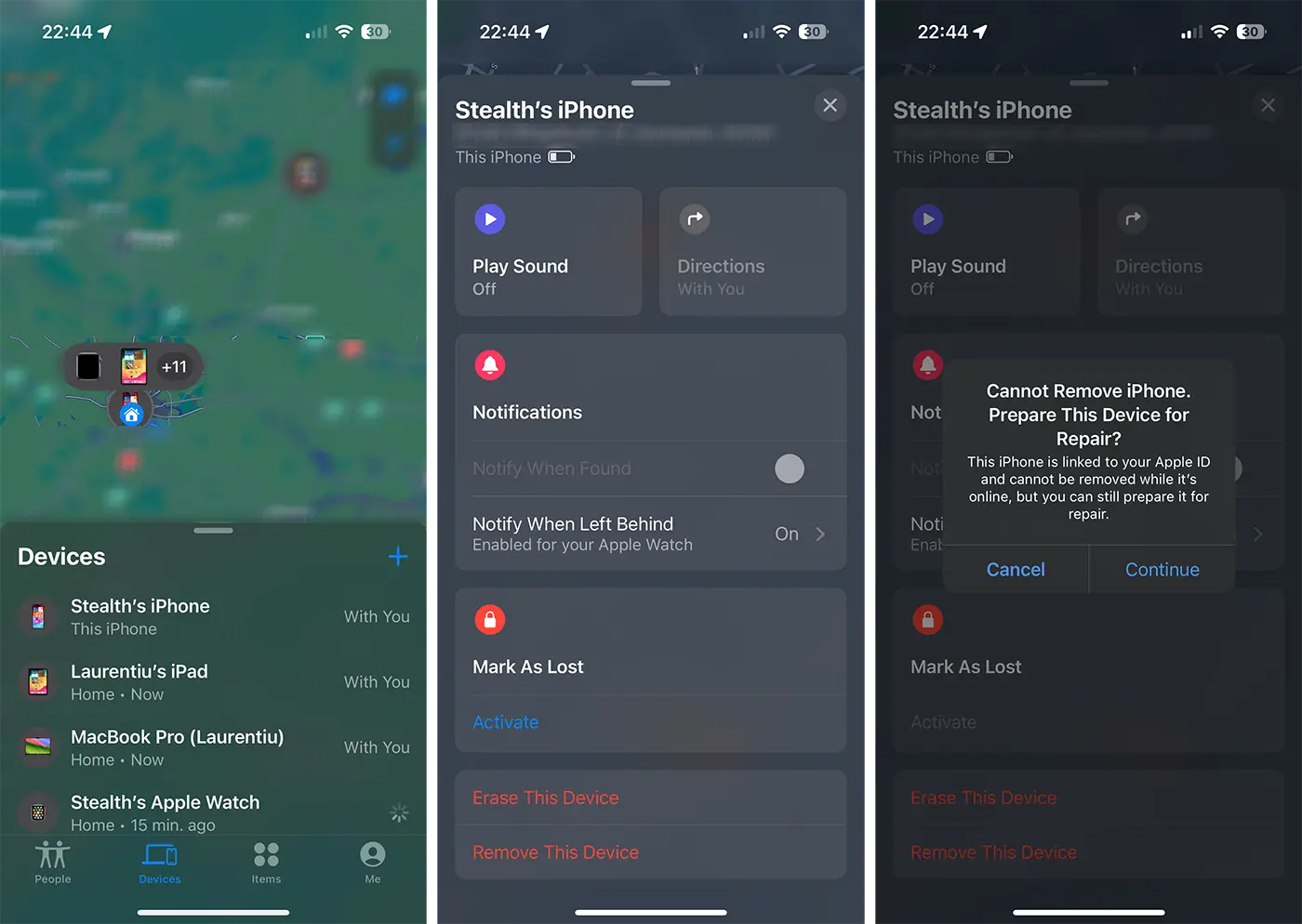
5. After pressing the "Continue" button, the device asks to enter your Apple ID account password.
Once this mode of repair is activated, the user receives a notification announcing that the device remains fully functional in the repair state.
It is not clear at the moment how "Repair State" can be disabled for iPhone devices. Apparently, the user has no option to do this. Most likely, the iPhone repair status will be disabled by Apple technicians or Apple's authorized service, after the device is repaired.
In conclusion, the repair state on the iPhone is activated only when the device must be prepared to be delivered in an Apple Apple service. Activating this mode is made from the "Find My" application on any device you have your Apple ID account.




































