

Tutorial step by step you see how you set another password for the user than that of icloud on OS X. (Yosemite, El Captain or older).
When installing the OS X operating system (Yosemite, El Capitan), Apple suggests that we use the iCloud password for the system user. User account password. This is a good thing on the one hand, because the iCloud password must contain at least 8 characters, an uppercase letter, a lowercase letter, numbers and a symbol / special character like “@#!?”. However, if you want to stop using your iCloud account password to log in on your Mac, you can set a different user password than iCloud.
It's a strong, hard-to-guess password for anyone who wants to gain unauthorized access to our Mac data. The less beautiful part is that every time we turn on the Mac, every time it goes to sleep or locks the screen (screensaver mode), we will have to enter the password. We waste little time entering a strong password of at least 8 characters, no matter how accustomed we are to typing it.
If when installing the system we chose to use the iCloud password for our account on OS X, we can change this very easily and choose a separate iCloud password.
How can you set another password for the user than the iCloud on OS X
1. Open System Preferences (click on the Apple logo) then go to the settings "Users & Groups“.
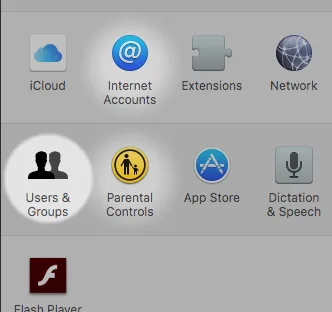
2. La setările “Users & Groups” alegi opțiunea “Change Password…” din dreptul user-ului tău.
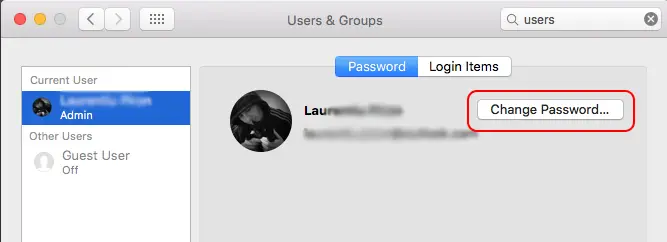
3. At this step, you are offered two options to choose the password for the system. You can choose to change your iCloud account password or set a different password for the user than iCloud on OS X.
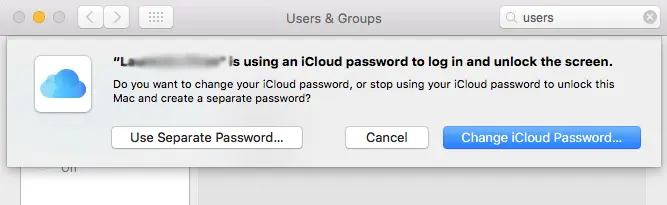
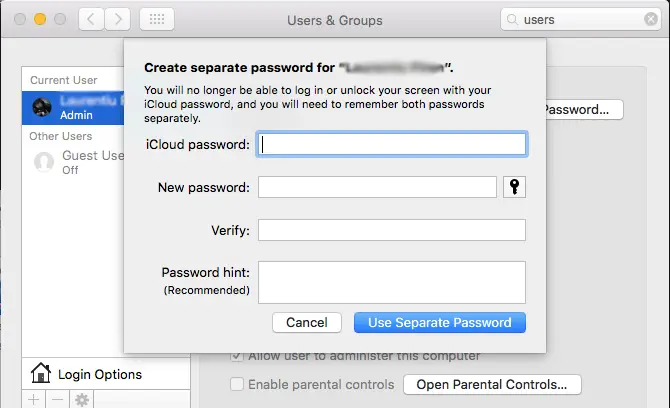
You choose to set another password for authentication on the system (Use Separate Password…), then in the box that opens, first enter the password of your iCloud account, then twice the new password for authentication on your MacBook or Mac. You can also enter a phrase that gives you clues about the password you choose.
Related: How can you see the passwords saved in safari on macos
Thus, you can set a different password for the user on OS X than the iCloud one. You can choose simpler passwords, composed of a single character, but the recommendation is to use strong passwords, difficult for other people to guess.




































