
I showed in an older article how we can see if an Apple device (MacBook, iMac, AirPods, iPhone, iPad, etc.) is still in the service warranty period, in which repairs of defects arising from causes other than those caused by improper use, are borne by Apple or the seller, without costs from the owner.
Related: How can we find out if MacBook / Mac / Imac / iPhone is in the warranty period
Table of Contents
Legal Warranty of Conformity and Apple's 1 YEAR Limited Warranty

Many buyers of Apple products are slightly misled by how the warranty certificates are presented and by the system in the device settings through which they can check the warranty offered by Apple.
Any consumer must know his rights and know that there are several types of guarantees, one of which is mandatory.
Legal Guarantee of Conformity in the European Union for this type of devices, it is minimum 2 years for individuals and 1 year for commercial companies, institutions and other entities. This warranty is mandatory and it cannot be substituted by Commercial Guarantee offered by the seller (which is actually more of an insurance than a guarantee) and not by Apple..
Both https://checkcoverage.apple.com as well as from the iPhone / iPad menu where we can check the Limited Warranty period (Limited Warranty), the warranty of conformity is not presented, but the limited warranty. So if we have an iPhone device bought on 18.11.2021, Apple's limited warranty will be until 18.11.2022 (1 year), but any failure caused by causes other than those that decline the right to free repairs or product replacement, will be borne by Apple or the seller, until 18.11.2023 (2 years). No limitations.
Therefore, the Limited Warranty offered by Apple for a period of 12 months is an additional warranty that does not replace, but overlaps with the legal warranty of compliance of 24 months, granted by the consumer protection legislation.
In addition to these two types of guarantees: Legal Guarantee of Conformity (24 months / EU) and Apple., users can also opt for extra guarantees, which are actually insurances. In exchange for a sum of money, the seller undertakes to change a device or repair it under certain terms and conditions for a longer period or in case of defects that are not covered by the Legal Guarantee of Conformity.
For Apple products, this extra warranty is offered through services AppleCare and AppleCare+.
How do you find out if iPhone or iPad is still in the Warranty check period)
Checking the iPhone Limited Warranty period
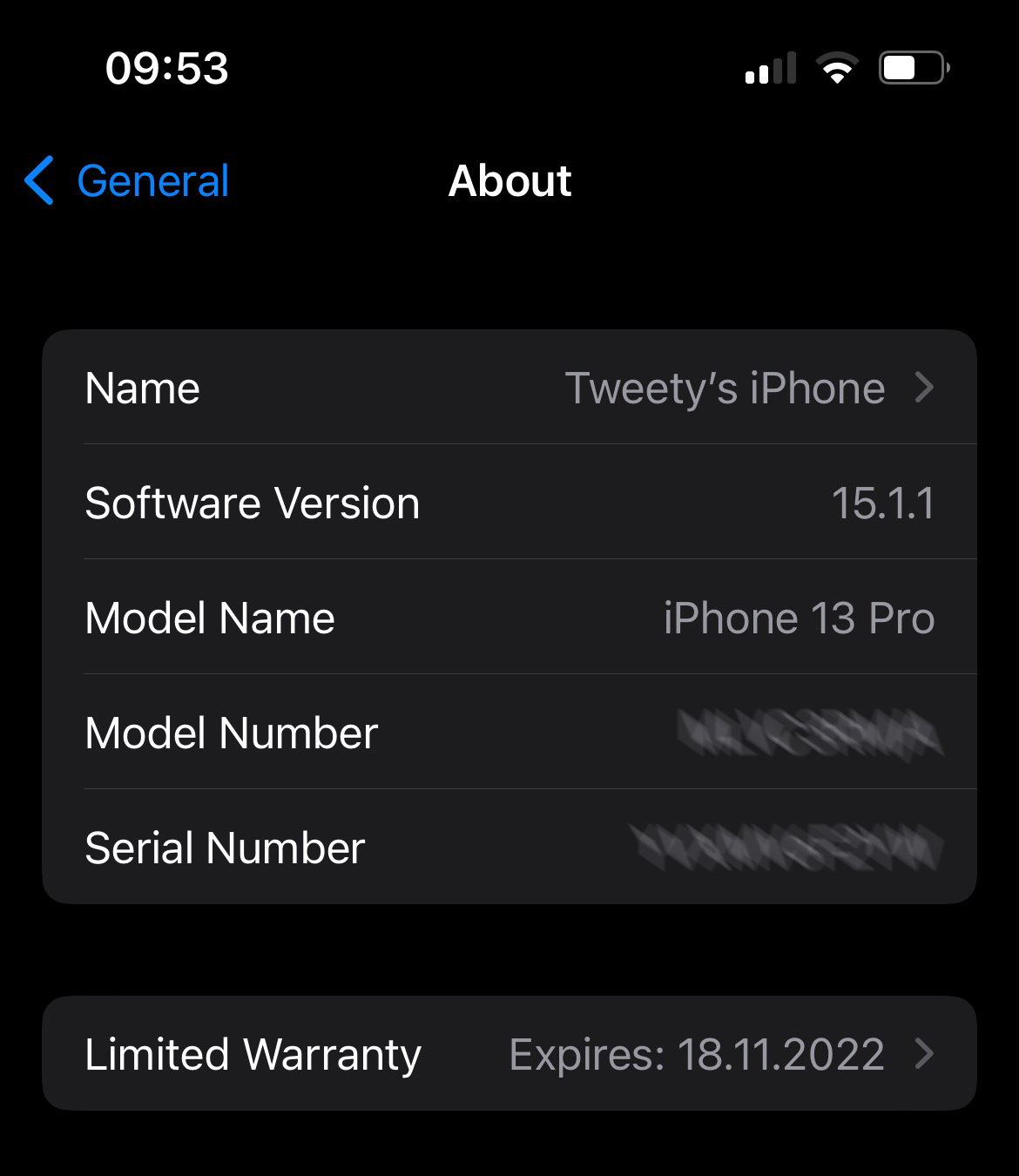
We are taking the case of an iPhone 13 Pro bought on 11/18/2021 for the first time.
Go to the Settings → About, and under the identification data of the device (name, software version, serial), we find the status of Apple's limited warranty. Limited Warranty.
Checking the iPad Limited Warranty period
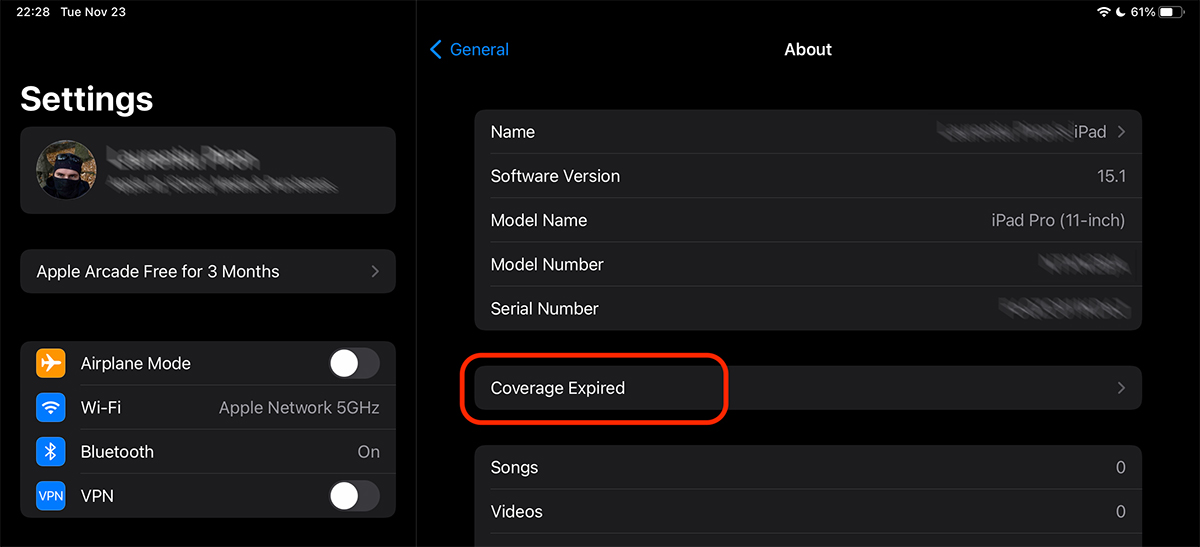
The limited iPad guarantee (iPados) can be found from the Settings menu, in the same way as on iPhone (iOS). In our case it is an iPad whose warranty period has expired. Both the 1 year limited Apple and the legal compliance guarantee. Coverage Expired.
For a device whose legal warranty period has expired, it is recommended that the repairs be done in an Apple authorized service. Even though most of the time, prices are higher than a clandestine sap, we are sure that this Respect Apple quality standards.
If we press on "Coverage Expired", We find information about support.
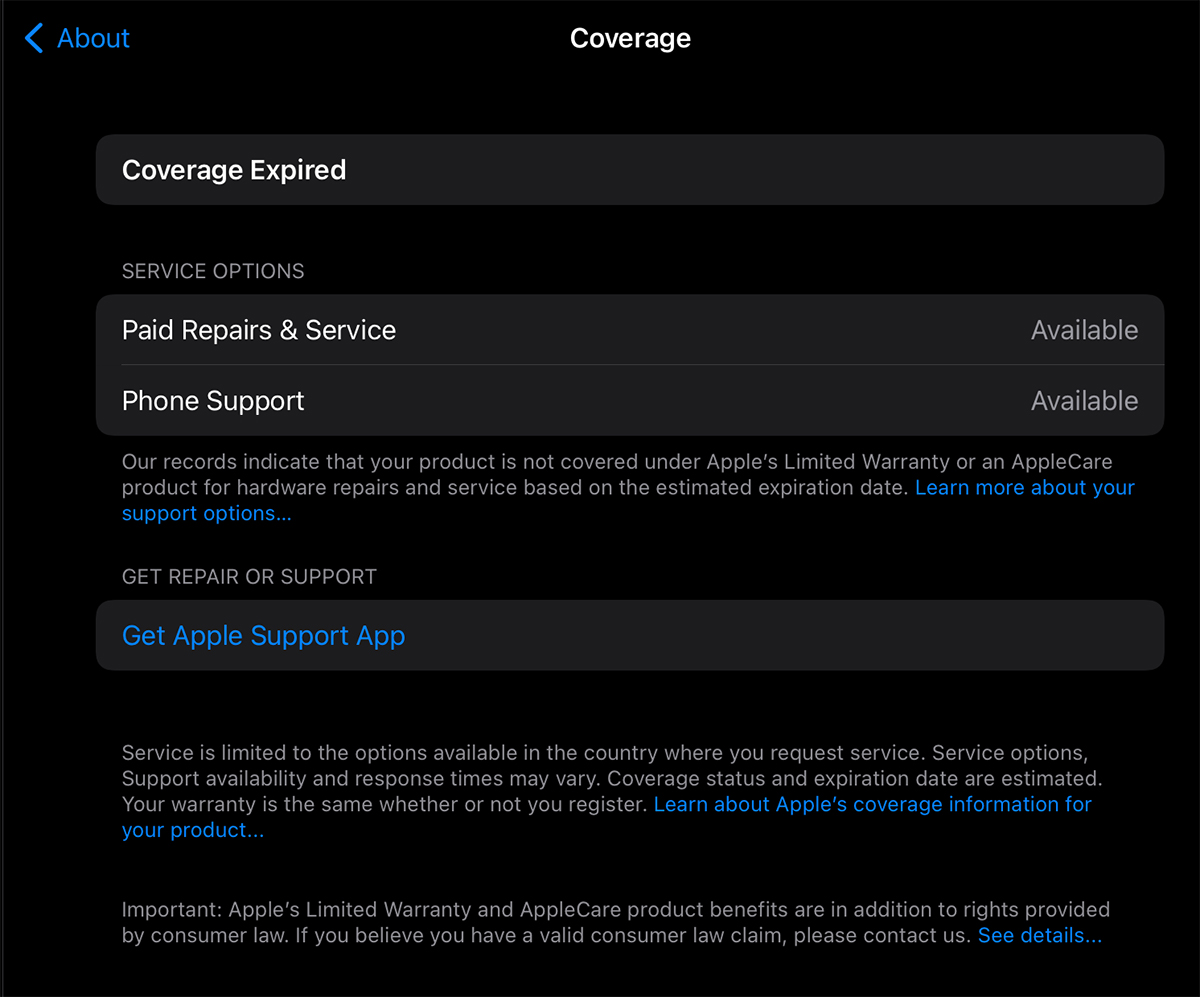
Next, Apple helps us locate an authorized service in our area, through the Apple Support application. Repairs with payment and telephone support remain available.
There is also the scenario in which the device is purchased after more than 12 months, the Limited Warranty expires, but the Legal Warranty of Conformity remains active. A situation in which the repairs will be borne by Apple or the seller.
Validity check of the Limited Warranty period for AirPods Pro / AirPods
If we no longer have the warranty certificate at hand, we can check the warranty status of the AirPods headphones directly from the iPad or iPhone to which they are connected.
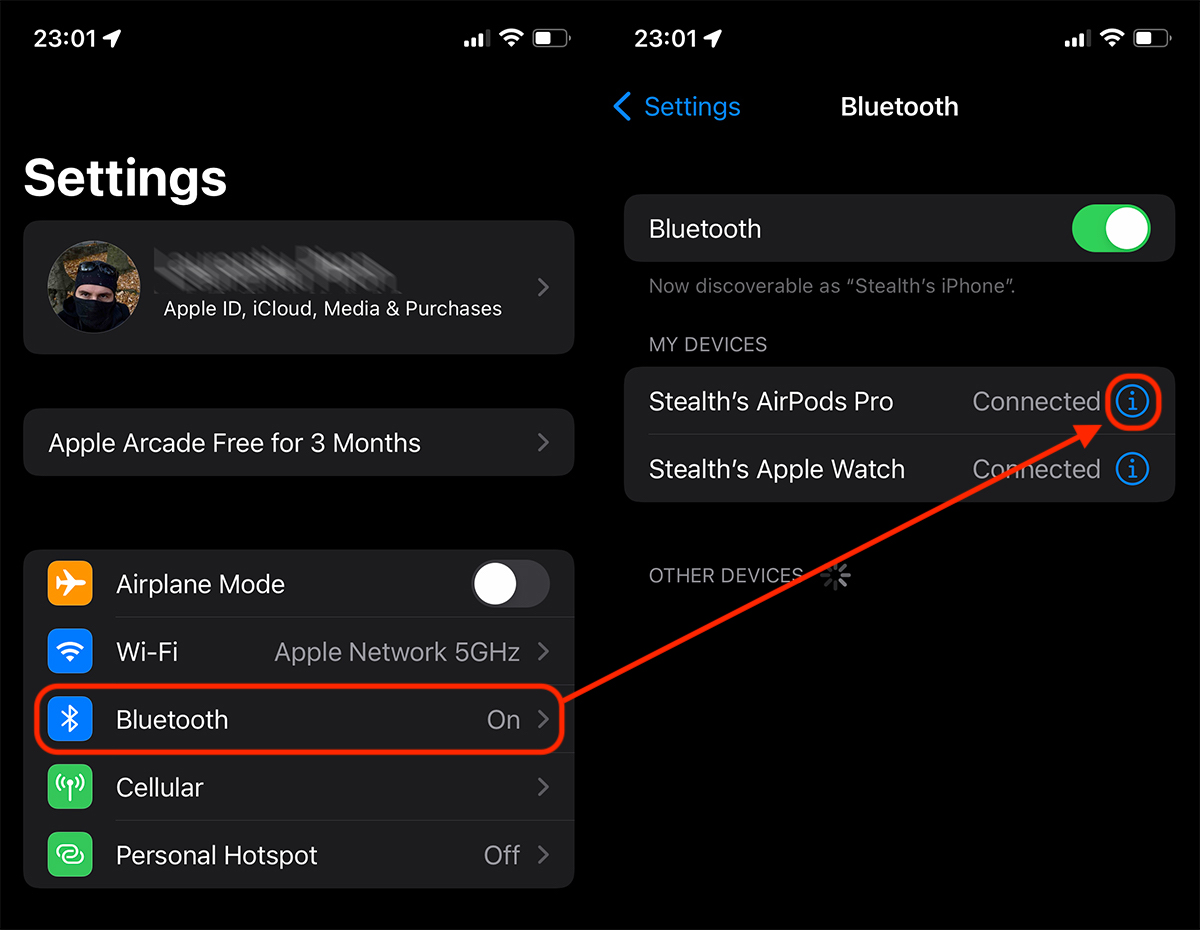
1. Connect the AirPods Pro headphones (in my case) to the iPhone, then go to: Settings → Bluetooth → press the blue "i" sign.
2. On the page with the specific settings of the AirPods headphones, we scroll to the bottom, where we find the status of the Apple Limited Warranty.
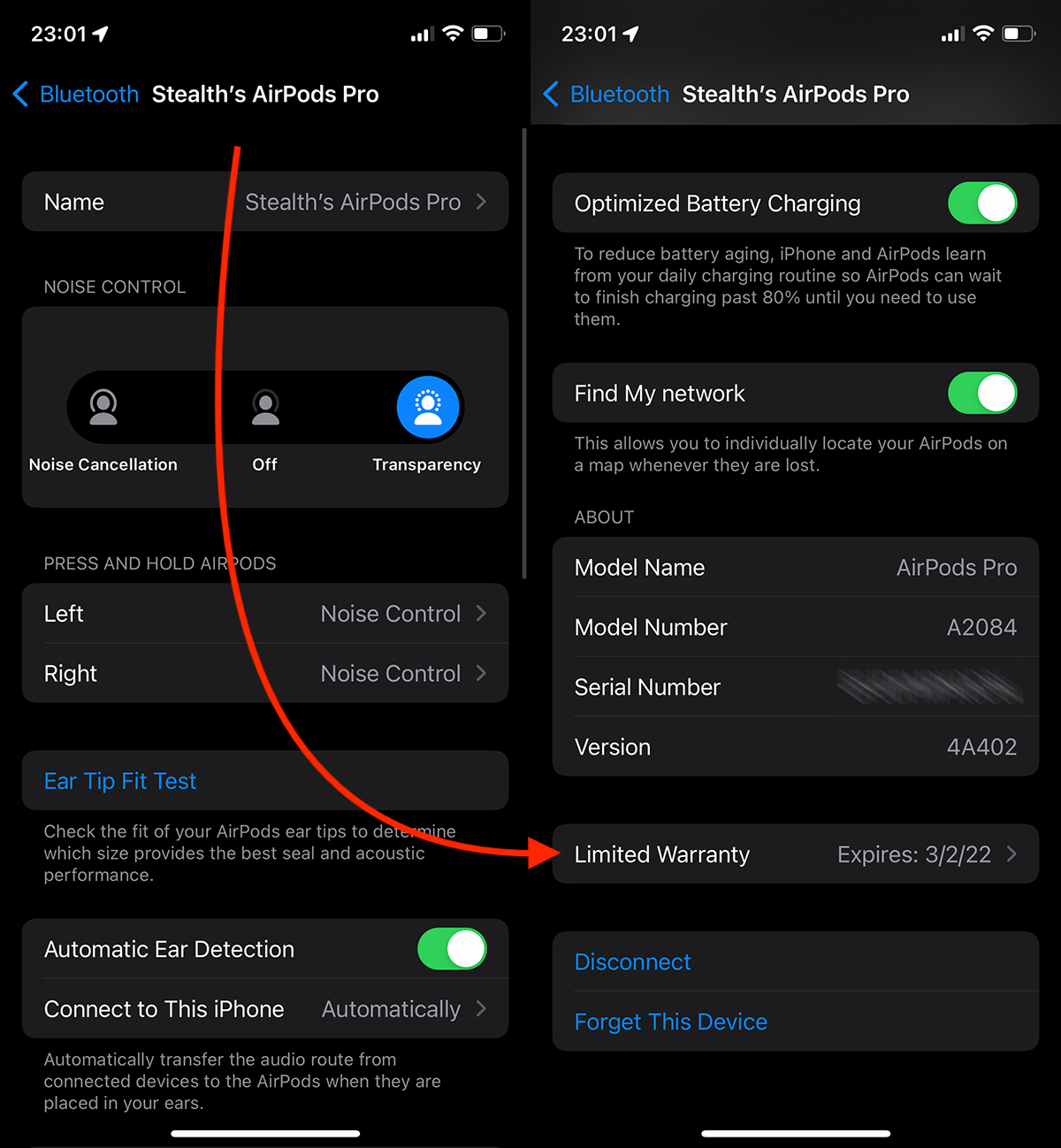
In this case, 1-year Apple Limited Guarantee of 1 year will expire on March 2, 2022, but according to the legal guarantee of conformity, any repairs covered by the guarantee will be made until March 2, 2023.
In conclusion, both on Apple's official page where you can check the warranty of a device based on Serial Number and from the iOS / iPadOS menu, you will not find information about the Legal Warranty of Conformity, which is mandatory. You can find this information on the physical or digital Warranty Certificate obtained at the time of purchase of the device. Both the period and the terms and conditions for granting the guarantee for iPhone, iPad, Apple Watch, AirPods, HomePod, MacBook or any other Apple device that benefits from the guarantee are specified there.


































I like Apple because they mostly change the products with new ones, if they are in the warranty period. they don't really stress about fixing them. That's how I made some AirPods and two iPads. They changed them right away.
@monsiur: yes, it's true, but this only happens in authorized Apple service.